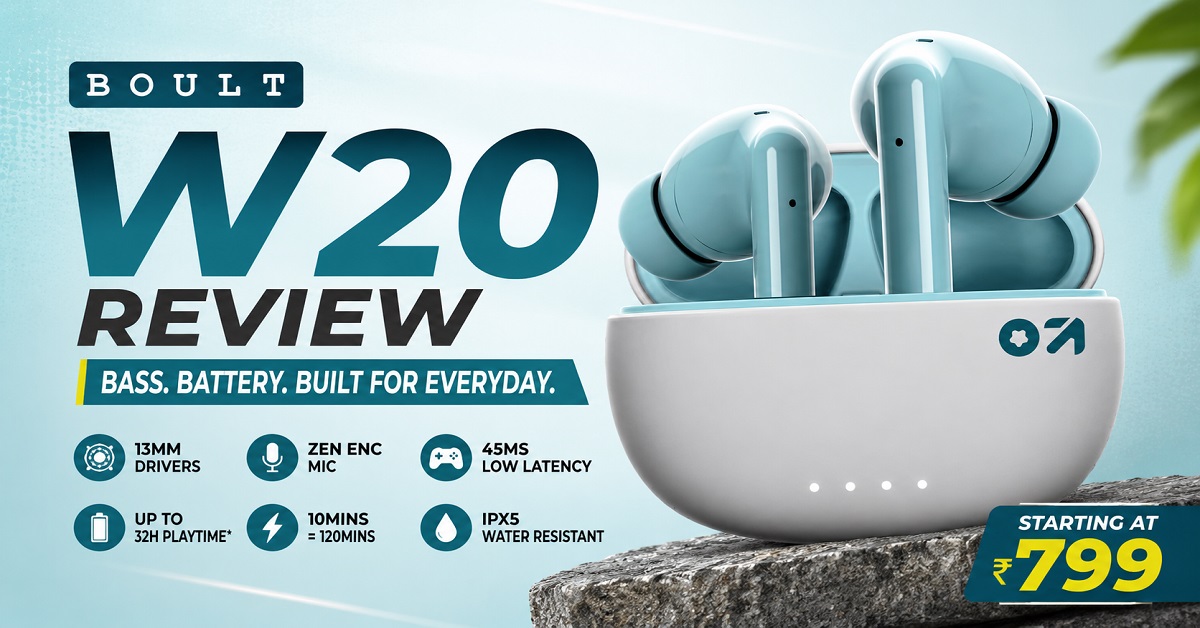
If you are looking for affordable wireless earbuds, the Boult W20 is the kind of TWS that can easily catch your attention. It offers 13mm drivers, 45ms low latency, Zen ENC for calls, Bluetooth 5.3, Type-C fast charging and an IPX5 rating. At the current price, it is also firmly positioned in the budget segment.
But specifications alone do not tell you whether a pair of earbuds is actually good.
A large driver does not automatically mean great sound. A low-latency mode does not make every gaming experience perfect. And ENC should not be confused with active noise cancellation.
So, is the Boult W20 worth buying?
In this Boult W20 review, we will look at its design, comfort, sound quality, calling performance, gaming latency, battery life, connectivity, water resistance and overall value for money. I will also point out the limitations you should know before spending your money.
The W20 currently costs ₹899 for Space Black and Glacier Blue, while the Pine Green variant is available for ₹799. Prices can change, so consider these as the prices at the time of writing.
Best Budget Pick
Boult W20 Truly Wireless Earbuds
- 13mm drivers for powerful, bass-focused sound
- 45ms low latency for casual mobile gaming
- Up to 120 minutes playback with 10-minute fast charge
- IPX5 water resistance for workouts and daily use
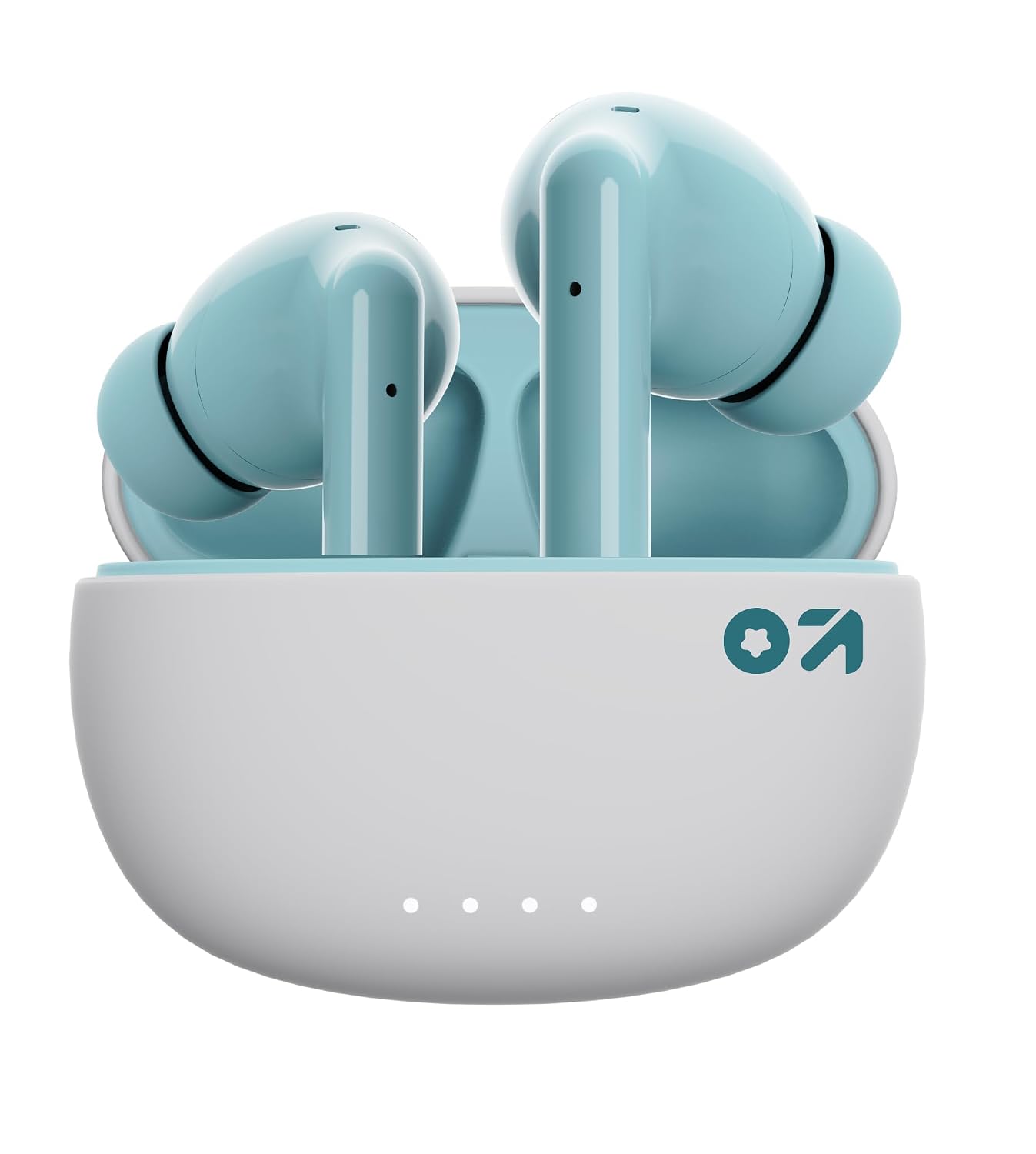
Looking for affordable TWS earbuds with powerful bass and useful everyday features? The Boult W20 offers 13mm drivers, 45ms low latency, Zen ENC for calls, Type-C fast charging and IPX5 water resistance. At the current price of ₹799 for Pine Green, it is a particularly attractive option for budget buyers.
Boult W20 Review: Quick Verdict
The Boult W20 is aimed at buyers who want a simple pair of budget TWS earbuds with strong bass, long claimed battery life, low gaming latency and basic water resistance without spending much money.
Its 13mm drivers should appeal to listeners who enjoy a bass-focused sound. The 45ms low-latency mode is also useful if you play mobile games where audio delay can be annoying. Type-C fast charging is another practical feature because a short charging session can provide a useful amount of playback time.
However, there are a few things to keep in mind.
The W20 uses Zen ENC rather than Active Noise Cancellation (ANC). ENC is mainly designed to reduce background noise picked up by the microphones during calls. It does not work like ANC, which actively reduces surrounding sounds while you listen to music.
There is also mixed customer feedback regarding microphone performance, connectivity and long-term reliability. That does not mean every unit will have these problems, but it is worth knowing before buying.
Our initial verdict: The Boult W20 looks like a strong budget option for bass lovers, casual gamers and everyday users who want useful features at a low price. But if your priority is strong noise cancellation or consistently excellent calling in noisy surroundings, you should consider other options.
Boult W20 Price in India
At the time of writing this review, the Boult W20 is available at different prices depending on the colour.
| Colour | Current price |
|---|---|
| Space Black | ₹899 |
| Glacier Blue | ₹899 |
| Pine Green | ₹799 |
The Pine Green variant at ₹799 is particularly interesting if you are simply looking for the lowest price.
At ₹799, the W20 is competing with some of the most affordable TWS earbuds available in India. That makes value for money very important.
Instead of asking whether the W20 has premium features, the better question is:
Does it offer enough useful features for the price?
On paper, it certainly does. You get 13mm drivers, Bluetooth 5.3, 45ms low latency, Zen ENC, Type-C charging, IPX5 water resistance and touch controls.
The important part of this review is finding out how those features translate into everyday use.
Boult W20 Specifications
Here are the main specifications of the Boult W20 based on the supplied product information and the manufacturer’s current product information.
| Feature | Boult W20 |
| Type | Truly Wireless Stereo (TWS) |
| Driver | 13mm |
| Bluetooth | Bluetooth 5.3 |
| Low Latency | 45ms |
| Microphone | Zen ENC |
| Battery | Up to 40 hours claimed in supplied listing |
| Fast Charging | 10 minutes = up to 120 minutes playback |
| Charging Port | USB Type-C |
| Water Resistance | IPX5 |
| Controls | Touch controls |
| Compatibility | Android and iOS |
| Warranty | 1 year |
| Colours | Space Black, Glacier Blue, Pine Green |
| Price | ₹799 to ₹899 currently |
One thing is worth pointing out about the battery specification.
The product information supplied for this article mentions 40 hours of playtime, while the current GoBoult product page lists different total-playback figures in its specifications. Because manufacturers can update product listings or revise how total playback is calculated, I would treat the advertised total as a claimed figure rather than a guarantee of exactly 40 hours in every situation.
The current Amazon listings also show the W20 at ₹899 for Glacier Blue and ₹799 for Pine Green, which matches the prices supplied for this review.
What Do You Get With the Boult W20?
The box contains the basic accessories you need to start using the earbuds.
You get:
- Boult W20 earbuds
- Charging case
- Extra pair of eartips
- Type-C charging cable
- User manual
- Warranty card
The inclusion of extra eartips is useful because earbud fit is more important than many first-time buyers realise.
Even if two people use the same earbuds, they may experience very different sound because their ear canals are different. A poor fit can reduce bass, make the earbuds feel loose and even affect how well you hear voices during calls.
So, don’t judge the W20’s fit using only the default eartips. Try the supplied alternatives if the earbuds feel loose or uncomfortable.
Boult W20 Design and Build Quality
The Boult W20 follows the familiar true wireless earbud design that has become common in the budget segment.
The earbuds sit inside a compact charging case, making the entire setup easy to carry in a pocket or small bag.
You can choose from three colours: Space Black, Glacier Blue and Pine Green.
Space Black is the safest choice if you prefer a simple and understated appearance. Glacier Blue gives the earbuds a slightly more noticeable look, while Pine Green is the more distinctive option and also happens to be the cheapest of the three at the current price.
The charging case is important for another reason: it protects the earbuds when you are not using them and provides additional battery capacity.
The W20 also uses touch controls, so you do not need to physically press a button on the earbuds every time you want to control playback or answer a call.
That can be convenient when you are walking, travelling or exercising.
Is the Boult W20 Comfortable?
Comfort is one of those things that cannot be judged entirely from a specification sheet.
The W20 uses an in-ear design, so the earbuds sit inside the ear canal rather than simply resting on the outer ear. This can provide a more secure fit, especially when you are walking or exercising.
However, the actual comfort will depend on your ear shape and the eartip size you use.
A good fit should feel secure without creating excessive pressure.
If the earbuds feel loose, try the larger eartips. If you feel too much pressure after wearing them for some time, try the smaller option.
Getting the fit right also has a direct effect on sound quality. When the ear tips create a proper seal, bass generally sounds fuller and outside sounds are naturally reduced.
This is especially important with a bass-focused earbud such as the W20.
Boult W20 Sound Quality
Sound quality is likely to be one of the biggest reasons someone considers the W20.
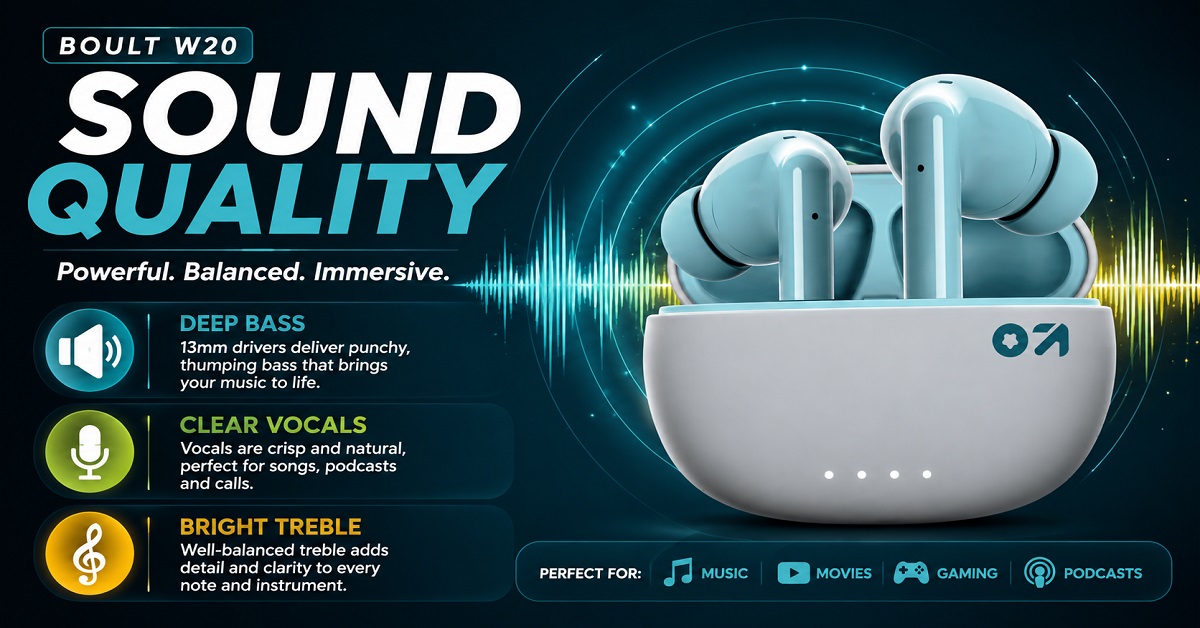
The earbuds use 13mm drivers, and Boult markets them toward listeners who enjoy powerful bass. The manufacturer’s current W20 page also describes the earbuds as using 13mm BoomX drivers and high-fidelity acoustics.
But what does a 13mm driver actually mean for you?
A larger driver can help an earbud produce a stronger and fuller presentation, but driver size alone does not determine sound quality. The tuning, earbud design, fit and audio processing all play a role.
For the W20, the more important point is that its sound signature is aimed at people who enjoy punchy and noticeable bass.
Bass
Bass is where the W20 is likely to appeal most to budget buyers.
If you listen to Bollywood songs, Telugu songs, hip-hop, EDM or other bass-heavy music, the extra low-end presence can make the listening experience more energetic.
For example, a song with a strong kick drum can sound more impactful compared with a very neutral pair of earbuds.
This does not mean the W20 is designed for someone looking for a completely flat or studio-style sound.
If your preference is powerful bass rather than analytical listening, the W20 makes more sense.
Vocals
For everyday listening, vocals need to remain clear enough to understand lyrics and spoken content.
This is particularly important for podcasts, YouTube videos and dialogue-heavy movies.
The W20’s overall bass-oriented approach means listeners who prefer a more balanced presentation may find other earbuds more suitable. But for general entertainment, the sound profile should appeal to people who like a little extra energy in their music.
Treble
Treble gives music its sense of detail and brightness.
The W20 is not something I would recommend purely to someone who wants a highly analytical listening experience. Its appeal is more about enjoyable everyday listening than trying to reproduce every tiny detail of a recording.
That is an important distinction.
At this price point, many buyers simply want music to sound enjoyable during a commute, workout or relaxing evening. For that audience, the W20’s tuning makes more sense.
Is the Boult W20 Good for YouTube and Movies?
Yes, this is one of the areas where a budget TWS like the W20 makes practical sense.
You can use it for:
- YouTube videos
- Movies and web series
- Music
- Podcasts
- Audiobooks
- Social media videos
The in-ear fit can also provide some passive isolation from surrounding sounds.
For example, if you are watching YouTube on your phone while sitting in a moderately noisy room, having the earbuds properly fitted can make dialogue easier to hear than using the phone’s built-in speakers.
However, remember that the W20 does not have Active Noise Cancellation.
This is an important point because the product uses Zen ENC, and the two technologies serve different purposes.
Zen ENC vs ANC: An Important Difference
This is probably one of the most important things to understand before buying the Boult W20.
ENC stands for Environmental Noise Cancellation.
It is primarily designed to help the microphone deal with background noise during calls. In simple terms, it helps the person on the other end hear your voice more clearly.
ANC, or Active Noise Cancellation, is different.
ANC uses microphones and processing to reduce certain external sounds that reach your ears while you are listening.
So if you are buying the W20 because you expect it to block traffic noise, aircraft engine noise or loud conversations around you, you should not expect the same experience as a dedicated ANC earbud.
GoBoult’s own W20 product page identifies the feature as Zen Mode Environmental Noise Cancellation, while its separate ANC range describes ANC as a technology that actively reduces unwanted ambient noise.
Therefore:
Boult W20 = Zen ENC for calls, not ANC for active noise blocking.
This distinction is worth remembering before you place your order.
Boult W20 for Calling
The W20 includes Zen ENC microphone technology, which is designed to improve voice clarity by dealing with environmental noise.
For normal indoor calls, the feature can be useful.
Imagine taking a call while sitting at home with a fan running in the background. The microphone processing is intended to help reduce unwanted environmental noise so that your voice is easier for the other person to hear.
Outdoor calling is a different challenge.
Traffic, wind, people talking nearby and other unpredictable sounds are much harder for any budget microphone system to handle consistently.
The customer feedback supplied for this review is also mixed. Some customers report clear call quality, while others have complained about poor microphone performance.
That is worth mentioning because an honest review should not present the W20’s ENC feature as a guarantee of perfect calls in every environment.
If calling is your number-one priority, particularly in noisy outdoor locations, you may want to consider a model with a stronger microphone system.
Boult W20 for Gaming
The W20 supports a 45ms low-latency mode, which is one of its more interesting features at this price.
Latency is basically the delay between an action and the sound you hear.
Consider a mobile game where you press the fire button and expect to hear the gunshot immediately. If there is noticeable audio delay, the experience can feel less responsive.
A low-latency mode reduces this delay.
The W20’s advertised 45ms latency is therefore useful for casual mobile gaming and games where sound timing matters. The manufacturer’s current product page also lists a 45ms Ultra Low Latency Combat Mode.
However, I would not buy the W20 solely because of the 45ms number.
Gaming performance also depends on the phone, game, Bluetooth connection and software implementation.
For casual gaming, the feature is a useful addition. For highly competitive players who want the lowest possible latency and specialised gaming features, a dedicated gaming-focused product may still be a better choice.
Boult W20 Battery Life and Fast Charging
Battery life is another major strength of the W20 on paper.
The supplied product information claims up to 40 hours of total playback, while fast charging can provide up to 120 minutes of playback from a 10-minute charge.
That quick-charge feature can be particularly useful in everyday situations.
Imagine you are leaving for work and suddenly realise the earbuds are almost empty.
Instead of waiting for a full charge, you can put them on charge for a short period and get additional listening time.
The Type-C port is also a welcome feature because USB Type-C has become the standard charging connection on most modern phones and accessories.
One thing to remember is that advertised total battery figures generally represent ideal or specified test conditions. Actual playback time can vary with volume level, usage patterns, Bluetooth conditions and other factors.
So, think of the advertised figure as a useful indication of battery capacity rather than a promise that you will always get exactly the same number of hours.
Boult W20 Connectivity
The W20 uses Bluetooth 5.3, which is a modern Bluetooth version and should provide a reliable connection with compatible devices.
It works with Android and iOS devices, making it suitable for most smartphone users.
For normal usage, pairing the earbuds with a phone should be straightforward.
However, Bluetooth version alone cannot guarantee that every user will have a completely problem-free connection.
Interestingly, the customer feedback you supplied includes both positive and negative experiences. Many users report seamless connectivity, while some have reported connection issues.
That means I would describe the W20’s connectivity as generally suitable for everyday use, but not something to buy expecting zero possibility of connection problems.
This is another example of why a good product review should look beyond the feature list.
Boult W20 Water Resistance
The W20 has an IPX5 water-resistance rating.
This makes it more suitable for situations where the earbuds may encounter sweat or water splashes.
For example, you can reasonably consider using them during:
- Walking
- Gym workouts
- Light outdoor activities
- Running
- Daily commuting
But there is an important limitation.
IPX5 does not mean the Boult W20 is waterproof.
Do not use the earbuds while swimming or deliberately submerge them in water.
The rating simply provides a degree of protection against water exposure. You should still take care when using them around heavy rain or water.
Boult W20: Things to Know Before Buying
Before clicking the buy button, keep these points in mind.
1. It does not have ANC.
The W20 uses Zen ENC, which is primarily for microphone noise handling during calls.
2. The 13mm driver does not automatically guarantee premium sound.
Driver size is only one part of the audio system. The W20 is better suited to people who enjoy an energetic, bass-focused sound.
3. Battery claims can vary in real use.
The advertised total playback figure is not necessarily what every user will experience.
4. Call quality may depend heavily on the environment.
The supplied customer feedback is mixed, especially regarding microphone performance.
5. IPX5 is not waterproofing.
It is better understood as protection against sweat and water splashes, not immersion.
These aren’t necessarily reasons to reject the W20. They simply help you understand what you are actually buying.
Boult W20 Review So Far
After looking at its core features, the W20 appears to be designed around a simple formula: low price + bass-focused sound + long claimed battery life + gaming-friendly latency + everyday convenience.
At ₹799 for Pine Green and ₹899 for the other colours, that combination is attractive for a budget buyer.
The 13mm drivers should appeal to bass lovers, while 45ms low latency gives casual gamers something extra. Type-C fast charging is useful for everyday life, and IPX5 protection adds some peace of mind during workouts.
But the W20 is not trying to compete with premium ANC earbuds.
Its Zen ENC should be understood as a calling feature rather than a replacement for active noise cancellation. The mixed customer feedback about calls, connectivity and reliability is also something prospective buyers should keep in mind.
In the next part of this review, we will go deeper into the Boult W20’s sound quality, calling performance, gaming experience, battery performance, everyday usability, pros and cons, and whether it is actually worth buying at ₹799 to ₹899.
Related AudioPick article: Boult K10 vs Boult W20
Related AudioPick article: Boult K10 Review
Boult W20 Sound Quality, Calling, Gaming and Everyday Performance
The Boult W20 looks attractive on paper, especially considering its budget price. But specifications such as 13mm drivers, 45ms latency and Bluetooth 5.3 do not tell the complete story.
What matters more is how these features translate into everyday use.
Is the sound enjoyable? Are voices clear during calls? Does the low-latency mode actually make gaming better? How useful is the battery life? And can you comfortably use the earbuds for several hours?
Let’s look at these areas one by one.
Boult W20 Sound Quality
The Boult W20 uses 13mm drivers, which is one of the main features highlighted for these earbuds. The manufacturer positions them toward listeners who want a powerful and bass-focused sound.
But there is something important to understand here.
A bigger driver does not automatically mean better sound quality.
The final sound depends on several things, including the driver itself, tuning, earbud design, software processing and how well the eartips seal your ears.
So, instead of judging the W20 simply because it has 13mm drivers, it is better to understand the type of sound it is designed to deliver.
Bass
Bass is where the W20 should appeal most to its target audience.
If you enjoy songs with strong beats, drums, electronic music, hip-hop or bass-heavy movie effects, the W20’s sound profile should feel energetic and enjoyable.
For example, when a song has a strong kick drum or deep bass line, you are likely to notice it more than you would with a very neutral pair of earbuds.
This makes the W20 a good match for casual listeners who want their music to sound lively rather than flat.
However, if you prefer a very balanced sound where bass does not receive much emphasis, the W20 may not be your ideal choice.
It is better to think of the W20 as a fun, bass-oriented pair of budget earbuds rather than a studio-monitor-style listening device.
Vocals and Mids
Bass is only one part of music.
Vocals, guitars, keyboards and other instruments sit largely in the midrange, so good vocal clarity is important for music as well as videos and podcasts.
The W20 is primarily designed for enjoyable everyday listening rather than highly analytical listening.
That means it makes sense for people who want to listen to songs while travelling, working, exercising or relaxing.
For podcasts, YouTube videos and normal conversations in movies, the earbuds should be perfectly practical.
If your main goal is to hear every tiny detail in a recording with a highly neutral presentation, however, you may want to look at a different type of earbud.
Treble and Detail
Treble contributes to the brightness and sense of detail in music.
The W20’s overall presentation is more focused on an energetic listening experience than on extracting every tiny detail from a recording.
This is not necessarily a disadvantage.
Most people buying TWS earbuds in this price range are not looking for studio monitoring. They want something that makes their favourite songs, YouTube videos and movies enjoyable.
For that purpose, the W20’s tuning makes sense.
Is Boult W20 Good for Movies and YouTube?
Yes.
The W20 is suitable for everyday entertainment such as YouTube, movies, web series, podcasts and music.
The in-ear design also provides some passive isolation because the eartips physically block part of the outside sound.
This can make voices and other audio easier to hear in moderately noisy surroundings.
Imagine watching a YouTube video while sitting in a room where a fan is running or people are talking quietly nearby. A properly fitted pair of in-ear earbuds can help you focus on the audio without having to increase the volume excessively.
But there is one important limitation.
The Boult W20 does not have Active Noise Cancellation.
If you frequently travel by bus, train or aeroplane and want the earbuds to actively reduce engine and environmental noise, you should look at an ANC model instead.
The W20’s Zen ENC serves a different purpose.
Zen ENC vs ANC: Don’t Confuse the Two
This is one of the most important things to understand before buying the W20.
ENC stands for Environmental Noise Cancellation.
In simple terms, it is designed to help the microphones deal with surrounding noise when you are speaking during a call.
ANC stands for Active Noise Cancellation.
ANC is designed to reduce external sounds that reach your ears while you are listening.
These are two different technologies.
For example, suppose you are sitting in a noisy cafe and talking to someone on the phone.
The W20’s Zen ENC is intended to help your voice reach the other person more clearly by reducing unwanted environmental noise picked up by the microphones.
But if you are sitting in the same cafe and listening to music, Zen ENC does not suddenly turn the W20 into an ANC earbud.
This distinction is important because some buyers may see the word “noise cancellation” in a product listing and assume that the earbuds can actively block outside sounds.
They cannot.
So if ANC is important to you, the W20 is not the right model.
Boult W20 Calling Performance
The W20 comes with Zen ENC microphones, which are designed to improve voice clarity during calls.
For normal indoor calls, this feature can be useful.
Think about situations such as:
- Calling family members from home
- Talking to friends
- Taking a quick office call
- Joining a short online meeting
- Speaking to someone while working
A relatively quiet environment is much easier for any microphone system to handle.
Outdoor calls are more challenging.
Traffic, wind, people talking nearby and other sudden sounds can make it difficult for a small earbud microphone to isolate your voice.
This is where the available customer feedback becomes useful.
The feedback supplied for this review is mixed. Some customers have reported clear call quality, while others have complained about poor microphone performance.
That does not mean every W20 will have a bad microphone.
It simply means you should not buy the W20 assuming that Zen ENC guarantees excellent calls in every environment.
If you mainly make occasional calls in quiet or moderately noisy surroundings, the W20 can make sense.
If you spend several hours every day in meetings and frequently take calls from busy streets, railway stations or other noisy places, I would look for a model with stronger and more consistently reviewed calling performance.
Boult W20 for Gaming
Gaming is another area where the W20 has something useful to offer.
It supports a 45ms low-latency mode, which Boult calls Ultra Low Latency Combat Mode.
But what does this actually mean?
What Is Low Latency?
Latency is the delay between something happening on your phone and the corresponding sound reaching your ears.
Imagine playing a shooting game.
You press the fire button and expect to hear the gunshot almost immediately.
If the audio reaches your ears noticeably late, the game can feel less responsive.
Low-latency technology reduces this delay.
The W20’s advertised 45ms latency is therefore useful for mobile gaming, particularly games where audio timing matters.
Is 45ms Good Enough?
For casual and regular mobile gaming, 45ms is a useful specification.
It should provide a more responsive experience than earbuds with a noticeably higher delay.
However, I would not call the W20 a professional gaming earbud simply because it has a 45ms mode.
Gaming performance also depends on the smartphone, game, Bluetooth implementation, software and connection quality.
So the best way to look at this feature is:
The 45ms mode is a useful bonus for gamers, not the main reason to buy the W20.
If you play games occasionally and also want earbuds for music, videos and calls, this feature adds value.
Boult W20 Battery Life
Battery life is one area where buyers need to be slightly careful because the available product information has changed.
The product details supplied for this review mention up to 40 hours of playtime.
However, the manufacturer’s current W20 product page now lists 35 hours of total playback, while another section of the same page mentions 32 hours. This means the advertised battery figure is not completely consistent across the current product information.
Because of this, I would avoid telling readers that the W20 will definitely provide exactly 40 hours.
The safer conclusion is that the W20 is designed to offer long overall battery life for a budget TWS, but actual playback will vary depending on usage and the specific product listing or revision.
What Does That Mean in Everyday Use?
For most people, the more useful question is not:
“Will I really get exactly 40 hours?”
It is:
“How often do I need to charge the earbuds?”
If you listen for one or two hours a day, the charging case should allow multiple listening sessions before you need to recharge it.
Someone who listens for 30 minutes a day will naturally get much longer between charges than someone using the earbuds for five or six hours every day.
Volume level also matters.
Higher volume generally uses more battery, so actual battery life can vary from the advertised figure.
For this reason, treat the manufacturer’s battery number as a claimed maximum under specified conditions, rather than something you should expect in exactly the same form every day.
Boult W20 Fast Charging
Fast charging is one of the W20’s more practical features.
The supplied product information says that 10 minutes of charging can provide up to 120 minutes of playback.
The manufacturer’s current product information also lists the same fast-charging claim.
This can be particularly useful when you forget to charge your earbuds.
For example, suppose you are leaving home for work and suddenly notice that your earbuds have very little battery remaining.
You don’t have to wait for a complete charge.
A short charging session can give you additional listening time before you leave.
This is the kind of feature that may not look particularly exciting on a specification sheet, but can become very useful in everyday life.
Type-C Charging
The W20 uses a USB Type-C charging port, which is convenient because Type-C has become common across phones, tablets, power banks and other electronic devices.
If you already use Type-C devices, you may not need to carry a separate charging cable specifically for the earbuds.
The charging case also includes a battery indicator according to the current product specifications.
Boult W20 Connectivity
The W20 supports Bluetooth 5.3, making it suitable for modern smartphones and other compatible devices.
It supports common Bluetooth profiles used for music, calls and media control, and is designed to work with both Android and iOS devices.
For everyday use, that is more than enough.
You can use the earbuds with:
- Android smartphones
- iPhones
- Tablets
- Laptops
- Other Bluetooth-compatible devices
Boult also advertises a Blink & Pair feature designed to make pairing quicker and easier.
How Reliable Is the Connection?
Bluetooth 5.3 is a good starting point, but the Bluetooth version alone cannot guarantee a perfect connection.
The customer feedback supplied for this review includes both positive and negative experiences.
Many users report that the connection works smoothly, while some customers have mentioned connection problems.
Therefore, I would describe the W20’s connectivity as suitable for normal everyday use, but not completely free from the possibility of connection issues.
Your phone, software, surrounding wireless interference and even the individual unit can affect the experience.
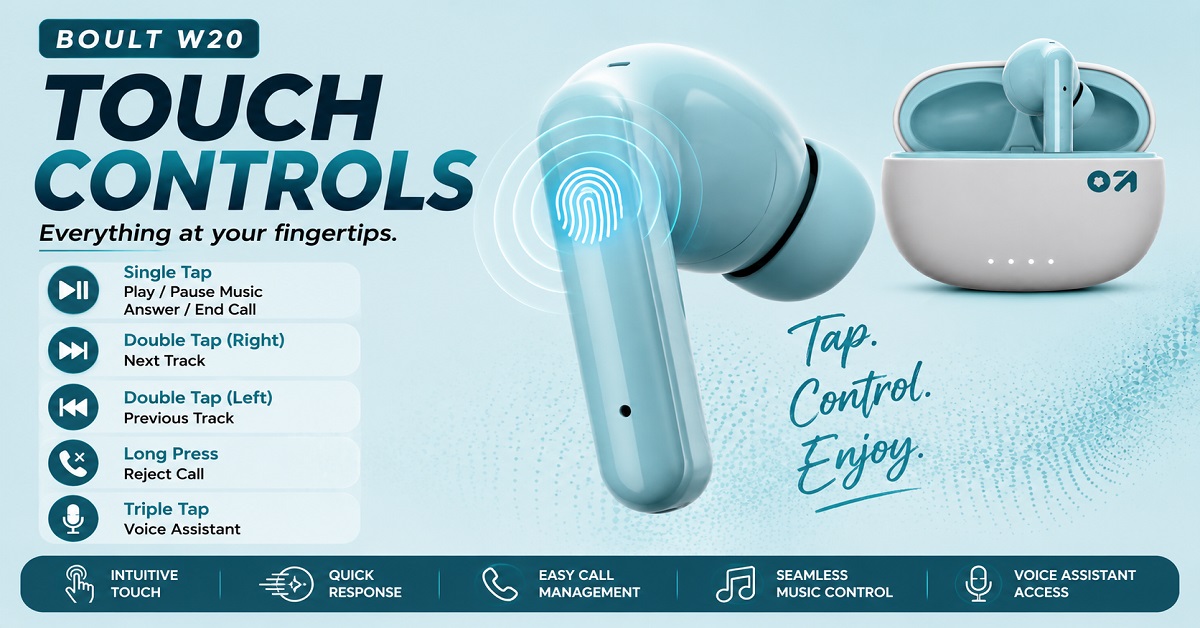
Boult W20 Touch Controls
The W20 uses touch controls instead of traditional physical buttons.
This allows you to operate basic functions without having to physically press the earbuds.
Touch controls can be convenient when you are:
- Listening to music
- Watching videos
- Answering calls
- Walking
- Exercising
There is also a practical advantage to touch controls.
When you press a physical button on some earbuds, the pressure can push the earbud further into your ear.
With touch controls, you can simply tap the surface.
However, touch controls have one common drawback.
You may occasionally trigger a command accidentally while adjusting the earbuds.
This is not a problem unique to the W20. It is simply one of the normal trade-offs of touch-controlled earbuds.
Boult W20 for Work and Online Meetings
The W20 can handle basic work-related audio needs.
You can use it for:
- Phone calls
- Short online meetings
- YouTube tutorials
- Podcasts
- Background music
- Voice calls
For someone working from home in a relatively quiet room, the W20 can be a practical low-cost option.
The main limitation remains the microphone.
If your work involves several hours of daily meetings and you need consistently clear voice transmission in noisy environments, I would spend more on a model that has a stronger calling reputation.
But if you only join occasional meetings or take normal phone calls, the W20 should be sufficient for many users.
Boult W20 for Workouts
The W20’s IPX5 water-resistance rating makes it more suitable for workouts than earbuds with no water-resistance rating.
Sweat and accidental water splashes are common during exercise, so having some protection is useful.
The in-ear design can also provide a secure fit if you choose the correct eartips.
However, there is an important limit:
Do not use the Boult W20 for swimming.
IPX5 does not mean the earbuds are waterproof or designed for submersion.
It is better to think of the rating as protection against water jets and splashes rather than complete waterproofing.
Boult W20 for Travel
The W20 can be a practical travel companion if your main requirements are music, videos and podcasts.
The compact charging case is easy to carry, and the in-ear design provides some passive isolation from outside sound.
Battery capacity and fast charging also reduce the need to constantly look for a charger.
However, there is one situation where I would recommend spending more.
If you frequently travel on aeroplanes or noisy trains and want to significantly reduce environmental noise, ANC earbuds are a better choice.
The W20 can play your music, but it cannot actively cancel the engine or surrounding noise.
That distinction becomes much more noticeable in very noisy environments.
Boult W20 for Different Types of Users
One useful way to judge the W20 is to look at different everyday situations.
| Usage | How well the W20 fits |
|---|---|
| Music | Good for bass-focused listeners |
| YouTube | Good |
| Movies | Good for everyday use |
| Podcasts | Good |
| Phone calls | Decent, but environment matters |
| Online meetings | Suitable for occasional use |
| Casual gaming | Good |
| Competitive gaming | Better to consider specialised options |
| Gym/workouts | Good |
| Travel | Good, but ANC would be better for noisy travel |
| Outdoor calls | Mixed depending on noise |
| Bass-heavy music | Very suitable |
| Neutral/analytical listening | Not the main strength |
This makes the W20’s target audience fairly clear.
It is primarily an affordable everyday entertainment earbud, rather than a specialised product for ANC, professional calls or audiophile listening.
Boult W20 Pros and Cons
Pros:
- 13mm drivers deliver powerful, bass-focused sound
- 45ms low-latency mode is useful for mobile gaming
- Type-C fast charging is convenient
- 10-minute charge provides up to 120 minutes of claimed playback
- Bluetooth 5.3 for modern wireless connectivity
- IPX5 water resistance makes it suitable for workouts
- Touch controls are convenient for everyday use
- Pine Green variant is available at ₹799
- 1-year manufacturer’s warranty
Cons:
- No Active Noise Cancellation (ANC)
- Zen ENC is mainly useful for calls and is not a replacement for ANC
- Call quality receives mixed customer feedback
- Some customers have reported connectivity issues
- Some users have reported reliability issues, including one earbud not working
- Battery claims are inconsistent across the available product information
- Bass-focused sound may not suit listeners who prefer a neutral sound signature
Best Budget Pick
Boult W20 Truly Wireless Earbuds
- 13mm drivers for powerful, bass-focused sound
- 45ms low latency for casual mobile gaming
- Up to 120 minutes playback with 10-minute fast charge
- IPX5 water resistance for workouts and daily use
Looking for affordable TWS earbuds with powerful bass and useful everyday features? The Boult W20 offers 13mm drivers, 45ms low latency, Zen ENC for calls, Type-C fast charging and IPX5 water resistance. At the current price of ₹799 for Pine Green, it is a particularly attractive option for budget buyers.
Who Should Buy the Boult W20?
The W20 makes the most sense for a particular type of buyer.
Buy it if you like bass-heavy music
If you enjoy songs with strong beats and want an energetic listening experience, the W20’s 13mm driver setup makes it worth considering.
Buy it if you play mobile games
The 45ms low-latency mode is useful if gaming is part of your daily earbud usage.
You get one pair of earbuds that can handle music, videos, calls and gaming instead of buying a separate gaming-focused product.
Buy it if you want quick charging
The fast-charging feature can be genuinely useful for people who frequently forget to charge their gadgets.
A short charging session can provide useful additional playback time.
Buy it for workouts
If you want an affordable pair of TWS earbuds for walking, gym sessions or running, IPX5 protection is a useful addition.
Just remember not to expose them unnecessarily to heavy water or submerge them.
Buy it if your budget is limited
This is probably the W20’s biggest advantage.
At the current price of ₹799 for Pine Green and ₹899 for Space Black and Glacier Blue, you get a reasonably long list of features without moving into a much higher price bracket.
Who Should Avoid the Boult W20?
The W20 is not the right choice if your expectations are significantly higher than what this price category can normally offer.
You want Active Noise Cancellation
If your main reason for buying earbuds is to block outside noise, skip the W20.
It has Zen ENC, not ANC.
You need excellent microphones for professional work
If you spend most of your working day in meetings and regularly take calls from noisy environments, look for earbuds with stronger and more consistently praised microphone performance.
You prefer neutral sound
If you want a very balanced sound signature with minimal bass emphasis, the W20 may not match your taste.
Its main appeal is an enjoyable, energetic presentation rather than a strictly neutral one.
Is Boult W20 Worth Buying at ₹799 to ₹899?
This is where the W20 becomes interesting.
At ₹799 for Pine Green, it offers particularly strong value if you are comfortable with its limitations.
At ₹899, the value proposition remains reasonable, but the decision depends more on your priorities.
You are getting several features that are genuinely useful:
- 13mm drivers
- 45ms low latency
- Bluetooth 5.3
- Type-C charging
- Fast charging
- IPX5 water resistance
- Touch controls
- Zen ENC
The important thing is not to buy the W20 expecting premium features simply because the specification list looks impressive.
If you want strong bass, casual gaming, everyday music and video playback, fast charging and basic water resistance, the W20 is a sensible budget option.
If you want ANC, premium call quality or highly refined sound, you should increase your budget and consider other models.
And if the Pine Green version is still available at ₹799, that is the version I would look at first from a pure value perspective.
What I Like About the Boult W20
The W20 gets several important things right for its price.
I particularly like the combination of bass-focused sound, low-latency mode, Type-C fast charging and IPX5 protection.
These are features that can actually affect everyday use.
The 45ms mode is useful for gamers, fast charging is useful for everyone, and IPX5 protection is reassuring if you use earbuds while exercising.
The low price also makes the W20 easier to recommend to someone who simply wants their first pair of wireless earbuds without spending too much.
What I Would Have Liked to See
The biggest missing feature is ANC.
Of course, adding ANC would likely increase the price, so its absence is understandable.
The other concern is consistency.
The mixed customer feedback about calling, connectivity and reliability means buyers should keep their expectations realistic.
I would also prefer clearer and more consistent battery specifications from the manufacturer. When one part of the product information says 40 hours and the current official page gives different figures, it becomes difficult for a buyer to know exactly which number to use.
That does not make the W20 a bad product.
It simply means the overall buying decision should be based on the complete feature set rather than one impressive battery number.
The Bottom Line
The Boult W20 is not trying to be a premium pair of wireless earbuds.
It is designed to give budget buyers a useful combination of features at a low price.
Its strongest points are bass-focused sound, 45ms low latency, Type-C fast charging, Bluetooth 5.3 and IPX5 protection.
The main compromises are the absence of ANC and the mixed feedback around microphone quality, connectivity and reliability.
At ₹799 for Pine Green, the W20 is particularly attractive for someone looking for an affordable everyday TWS. At ₹899 for Space Black and Glacier Blue, it is still worth considering if its feature set matches your needs.
The most important thing is to buy it for the right reasons.
If you want an affordable, bass-focused TWS for music, videos, casual gaming and everyday use, the Boult W20 is worth considering. If you specifically want ANC or excellent professional calling performance, look elsewhere.
Boult W20 Review: Final Verdict and Buying Guide
After looking at the sound, calling, gaming, battery, connectivity, comfort and other important features, we can now answer the question that matters most:
Should you buy the Boult W20?
The short answer is: yes, if you want affordable TWS earbuds with bass-heavy sound, low-latency gaming and useful everyday features.
But it is not the right choice for everyone.
The W20 makes the most sense when you understand what it is designed to do and what it does not offer.
What Are the Best Things About the Boult W20?
The W20 has several features that make sense at its current budget price.
1. Bass-focused sound
The 13mm drivers make the W20 a natural choice for people who enjoy energetic, bass-heavy music.
If your playlist contains plenty of Bollywood, Telugu, Tamil, hip-hop, EDM or other beat-heavy songs, the sound signature should be appealing.
It is not designed primarily for people who want a completely neutral or studio-style sound.
2. 45ms low latency
The 45ms low-latency mode is useful if you play mobile games.
It can reduce the delay between what happens on your phone and what you hear through the earbuds.
It is not a replacement for a dedicated gaming headset, but it is a useful feature to have in a budget TWS.
3. Fast charging
The advertised 10-minute charging time for up to 120 minutes of playback is genuinely useful.
You don’t always remember to charge your earbuds.
A quick top-up before leaving home can give you enough listening time for a commute, workout or other short trip.
4. IPX5 water resistance
The IPX5 rating adds some protection against sweat and water splashes.
That makes the W20 more suitable for workouts and outdoor activities than earbuds without any stated water resistance.
Just remember that IPX5 does not mean waterproof.
5. Affordable price
The current colour-wise pricing makes the W20 particularly interesting.
Pine Green is ₹799, while Space Black and Glacier Blue are ₹899 based on the price provided for this review.
At ₹799, getting features such as 13mm drivers, Bluetooth 5.3, 45ms low latency, Type-C charging and IPX5 protection makes the W20 a compelling budget option.
What Are the Biggest Problems With the Boult W20?
The W20 also has some limitations that you should know before buying.
No ANC
This is probably the most important one.
The W20 has Zen ENC, not Active Noise Cancellation.
If you are looking for earbuds that actively reduce outside noise while you listen to music, this is not the model to buy.
The distinction is simple:
ENC helps with microphone noise during calls.
ANC helps reduce surrounding noise while listening.
Don’t buy the W20 expecting ANC performance.
Calling performance is not its strongest point
The Zen ENC microphone system is useful, but customer feedback is mixed.
Some buyers are satisfied with call clarity, while others have reported poor microphone performance.
Therefore, I would consider the W20 suitable for normal everyday calls, but I would be more cautious if you need consistently excellent microphone performance for professional meetings in noisy environments.
Some reliability and connectivity concerns
The customer feedback supplied for this review also includes reports of connectivity problems and occasional reliability issues, including situations where one earbud stopped working.
These reports do not mean that every W20 unit will develop such problems.
But they are worth mentioning because an honest buying guide should cover both the good and bad experiences reported by customers.
Boult W20 Value for Money
Value for money is where the W20 becomes more interesting.
At ₹799 to ₹899, you are not buying premium earbuds.
That means you should judge the W20 based on what it offers within this budget rather than comparing it directly with ₹3,000 or ₹5,000 TWS models.
For the price, the feature combination is strong.
You get:
- 13mm drivers
- Bluetooth 5.3
- 45ms low latency
- Zen ENC
- Type-C charging
- Fast charging
- IPX5 protection
- Touch controls
- One-year warranty
The official GoBoult page also highlights the W20’s 13mm BoomX drivers, 45ms low latency, Zen Mode ENC and Blink & Pair technology.
That is a lot of functionality for a budget TWS.
However, value for money is not just about the number of features.
If you don’t care about gaming, low latency may not matter much.
If you mainly want ANC, the W20’s feature list will not solve your problem.
If you spend hours every day on work calls, microphone quality becomes more important than driver size.
So the W20 offers good value for the right type of buyer.
Which Boult W20 Colour Should You Buy?
There are three colour options:
- Space Black
- Glacier Blue
- Pine Green
If all three have the same specifications, your decision can be simple.
Choose Pine Green if you want the lowest price
At the current ₹799, Pine Green gives you the best price-to-feature value.
If colour is not important to you, there is little reason to spend ₹100 more simply to get another colour.
Choose Space Black if you prefer a classic look
Space Black is the safer choice if you prefer a simple and understated appearance.
It is less likely to show visual dirt compared with lighter colours.
Choose Glacier Blue if you want something different
Glacier Blue gives the earbuds a more noticeable appearance.
If you like the colour and don’t mind paying ₹100 more, there is no functional reason to avoid it.
Boult W20 vs Boult K10
If you are specifically comparing the W20 with another Boult budget model, don’t choose simply based on which one has the bigger driver or newer-looking design.
Look at your actual priorities.
The Boult K10 vs Boult W20 comparison on AudioPick can help you make that decision.
The important thing is to choose the model that better matches how you actually use earbuds.
For example, someone who mainly listens to bass-heavy music and plays games may prefer the W20, while another buyer may place greater importance on battery life, calling or other features offered by the K10.

Is Boult W20 Good for Students?
Yes, the W20 can be a practical option for students.
A student can use it for:
- Online classes
- YouTube lectures
- Music
- Podcasts
- Gaming
- Phone calls
- Travelling
The low price is also useful when the earbuds are going to be used heavily every day.
The only thing I would keep in mind is that if online classes and calls are the main purpose, microphone quality becomes more important than bass.
For a student who mainly wants music and entertainment with occasional calls, the W20 makes more sense.
Is Boult W20 Good for Office Use?
It depends on what you mean by office use.
For listening to music during work, watching tutorials and taking occasional calls, the W20 should be fine.
For someone who spends most of the day in Microsoft Teams, Google Meet or Zoom meetings, I would be more selective.
The microphone feedback is mixed, so the W20 would not be my first choice if professional voice communication is your main requirement.
For occasional meetings, however, it can still be a reasonable budget option.
Is Boult W20 Good for Travel?
For general travel, yes.
The compact TWS design is convenient, and the charging case means you don’t have to carry a larger pair of headphones.
The bass-focused sound can also make music and movies enjoyable during a journey.
But there is one major exception.
If you frequently travel by aeroplane or train and want to reduce the sound of engines and surrounding passengers, you should consider ANC earbuds instead.
The W20 cannot provide that type of active noise reduction.
Is Boult W20 Good for Running?
The W20 can work for running and workouts because of its in-ear design and IPX5 rating.
The most important thing is getting the right eartip size.
If the earbuds are too loose, they may move around while running.
If they are too tight, they can become uncomfortable during longer workouts.
Try the supplied eartips and find the size that gives you a secure fit without excessive pressure.
And remember that IPX5 protects against water exposure to a certain extent. It does not make the earbuds suitable for swimming.
Boult W20: Who Is It Actually For?
After considering all its strengths and weaknesses, the W20 is best suited to someone who wants an affordable all-rounder.
It is particularly suitable for a buyer who says:
“I want good bass, decent battery life, low-latency gaming, Type-C charging and workout-friendly water resistance, but I don’t want to spend a lot.”
That is exactly where the W20 makes sense.
It is less suitable for someone who says:
“I want excellent ANC, premium microphone quality and highly detailed audio.”
That buyer should increase the budget and consider a more advanced TWS model.
Boult W20 Final Verdict
The Boult W20 is a good budget TWS option, provided you buy it with realistic expectations.
Its biggest strengths are its 13mm drivers, bass-focused sound, 45ms low latency, Type-C fast charging, Bluetooth 5.3 and IPX5 water resistance.
These features make it suitable for music, YouTube, movies, casual gaming, workouts and everyday listening.
The W20’s biggest weaknesses are equally clear.
There is no ANC, the calling experience receives mixed customer feedback, and there are some reports of connectivity and reliability issues.
The battery specification also deserves a little caution because the supplied listing mentions 40 hours, while GoBoult’s current official page describes the W20 with 32 hours of playtime.
For that reason, I would not recommend buying the W20 simply because of its advertised battery number.
Instead, look at the complete package.
At ₹799 for Pine Green, the W20 is particularly attractive for a budget buyer.
At ₹899 for Space Black and Glacier Blue, it remains a reasonable option if you like its bass-heavy sound and need the gaming, charging and water-resistance features.
Best Budget Pick
Boult W20 Truly Wireless Earbuds
- 13mm drivers for powerful, bass-focused sound
- 45ms low latency for casual mobile gaming
- Up to 120 minutes playback with 10-minute fast charge
- IPX5 water resistance for workouts and daily use
Looking for affordable TWS earbuds with powerful bass and useful everyday features? The Boult W20 offers 13mm drivers, 45ms low latency, Zen ENC for calls, Type-C fast charging and IPX5 water resistance. At the current price of ₹799 for Pine Green, it is a particularly attractive option for budget buyers.
Our recommendation
Buy the Boult W20 if: you want an affordable bass-focused TWS for music, videos, casual gaming, workouts and everyday use.
Think twice if: calling is your main priority or you need consistently reliable performance for professional meetings.
Skip it if: you specifically want ANC or a highly refined, neutral sound signature.
Overall, the Boult W20 is worth considering in the ₹799 to ₹899 price range, especially for buyers who want more features without spending much.
Watch a 100-Day Boult W20 Experience
Want to see how the Boult W20 holds up after extended everyday use? Before continuing with our detailed review, take a few minutes to watch this 5-minute video from SB Digital, where the creator shares his experience with the Boult W20 after using the earbuds for 100 days.
The video gives you a useful real-world perspective on the earbuds, including what it is like to use them over a longer period. Watch the video first, then come back and continue reading our review to get our detailed analysis of the sound quality, calling, battery life, gaming performance, comfort and other important aspects.
Video Credit: SB Digital
Frequently Asked Questions About Boult W20
Is Boult W20 worth buying?
Yes, the Boult W20 is worth considering if you want affordable TWS earbuds with bass-focused sound, 45ms low latency, fast charging and IPX5 water resistance.
It is not the best choice if ANC or premium calling performance is your main priority.
Does Boult W20 have ANC?
No.
The Boult W20 uses Zen ENC, which is designed to help reduce environmental noise picked up by the microphone during calls.
It does not have Active Noise Cancellation for listening.
What is the Boult W20 battery life?
The supplied product listing mentions up to 40 hours of total playtime, while the current GoBoult product page describes the W20 as having 32 hours of playtime.
Because the manufacturer’s current information differs from the supplied listing, it is better to treat the advertised figure as a claimed maximum rather than a guaranteed real-world result.
Does Boult W20 support fast charging?
Yes.
The supplied product information states that a 10-minute charge can provide up to 120 minutes of playback.
This makes the W20 convenient when you need a quick battery boost.
Is Boult W20 good for gaming?
Yes, for casual and regular mobile gaming.
It has an advertised 45ms low-latency mode, which can reduce the delay between game actions and audio.
Competitive gamers with more demanding requirements may still prefer specialised gaming earbuds or wired audio.
Is Boult W20 good for calling?
It can be suitable for normal everyday calls, particularly in quieter environments.
However, customer feedback about microphone performance is mixed.
If you regularly make calls in noisy outdoor environments, you may want to consider a model with stronger calling performance.
Is Boult W20 waterproof?
No, it should not be considered waterproof.
It has an IPX5 water-resistance rating, which provides protection against sweat and water exposure but does not make the earbuds suitable for swimming or underwater use.
Does Boult W20 have Bluetooth 5.3?
Yes.
The W20 uses Bluetooth 5.3 and is designed for use with compatible Android, iOS and other Bluetooth devices.
Does Boult W20 have touch controls?
Yes.
The earbuds use touch controls for convenient operation of music, calls and other functions.
What is the price of Boult W20?
Based on the current prices supplied for this review, the Pine Green version costs ₹799, while Space Black and Glacier Blue cost ₹899.
Online prices can change, so check the current price before purchasing.
Which colour of Boult W20 is best?
The colour does not change the core specifications.
If you want the lowest price, Pine Green at ₹799 is the obvious choice.
If you prefer a more traditional look, choose Space Black. Glacier Blue is better if you want a more distinctive colour.
Does Boult W20 support Type-C charging?
Yes.
The W20 uses a USB Type-C charging port.
Is Boult W20 good for workouts?
Yes.
Its IPX5 water-resistance rating makes it suitable for workouts where sweat and occasional water splashes are expected.
Make sure you choose the correct eartip size so the earbuds stay secure during movement.
Can I use Boult W20 with an iPhone?
Yes.
The W20 uses Bluetooth and can be paired with compatible iPhones as well as Android smartphones.
Final Recommendation
The Boult W20 is a product that makes sense when its strengths match your needs.
It gives budget buyers a combination of bass-focused sound, low-latency gaming, fast charging, Bluetooth 5.3 and IPX5 protection at a price that is easy to consider.
Its limitations are also clear.
You don’t get ANC, and the calling and reliability feedback is not completely consistent.
So don’t buy the W20 expecting it to behave like a premium ₹3,000 or ₹5,000 pair of earbuds.
Buy it for what it actually offers.
For ₹799, the Pine Green Boult W20 is particularly easy to recommend to a budget buyer who wants an everyday TWS with strong bass and useful extra features. At ₹899, it remains a good option, provided you don’t need ANC or top-level calling performance.
Check the latest Boult W20 price on Amazon
Disclosure: This article contains affiliate links. If you purchase the product through our link, AudioPick may earn a small commission at no additional cost to you. This helps support the website and does not affect our recommendation.

About the Author
Hari Prasad is the editor of AudioPick.in and a lifelong audio enthusiast. He writes detailed, honest reviews and guides to help everyday users pick the right gear without tech jargon. His personal interest in Bluetooth audio, neckbands, and codecs comes from testing dozens of devices over the past few years.