Buying earbuds can be surprisingly confusing. You may see one model with 50dB ANC, another with 13mm drivers, another with 40ms latency, and another promising 60 hours of battery life. But which of these features actually matter to you?
The answer depends on how you plan to use the earbuds.
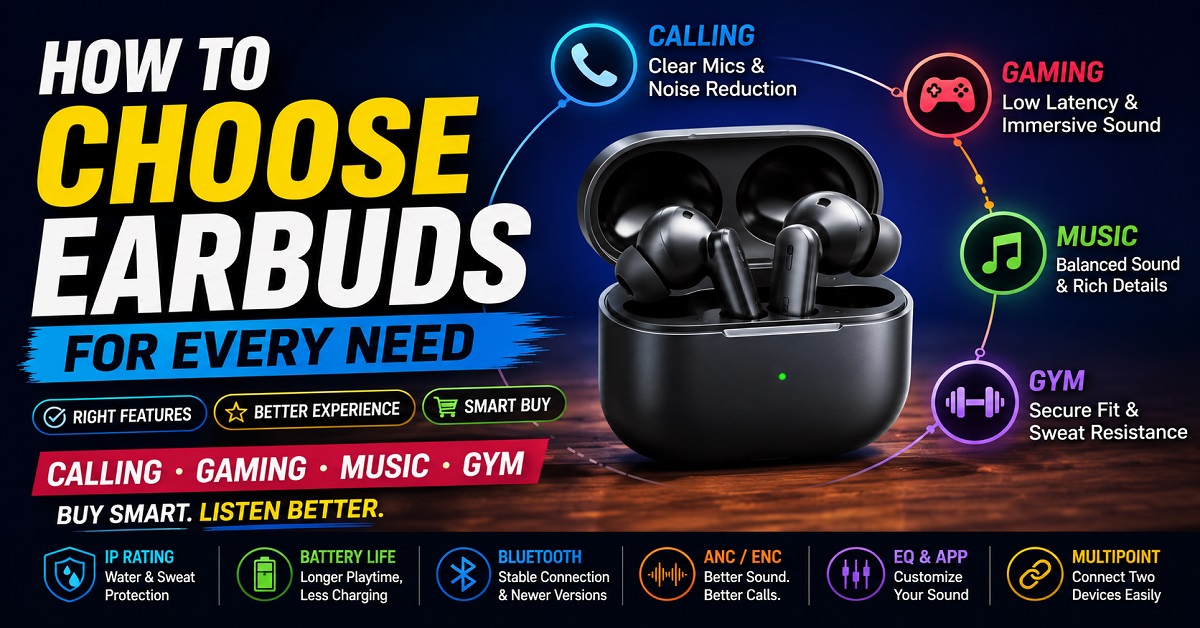
If you mainly take calls, microphone quality and noise handling should be high on your list. If you play mobile games, latency and sound positioning matter more. Music listeners should pay closer attention to sound tuning and EQ, while gym users need a secure fit, sweat resistance and comfort.
In this guide, we’ll explain how to choose earbuds based on these different needs instead of simply comparing specification numbers.
How to Choose the Right Earbuds
The best earbuds are not necessarily the ones with the biggest drivers, highest ANC rating or longest battery life.
They are the ones whose features match your daily use.
For example, imagine two people buying earbuds for ₹3,000.
The first person works from home and spends several hours every day on video calls. For that person, a good microphone, comfortable fit and multipoint connectivity may be more useful than extremely powerful bass.
The second person goes to the gym every morning and listens to music while exercising. That person may care much more about a secure fit, sweat resistance and battery life.
Both are looking at the same budget, but they need completely different earbuds.
That’s why you should decide what you will use the earbuds for before looking at specific models.
Quick answer: What should you look for in earbuds?
Here are the main things to consider:
- Calling: Microphone quality, voice clarity and noise reduction
- Gaming: Low latency, sound positioning and microphone quality
- Music: Sound tuning, bass, vocals, treble and EQ
- Gym: Secure fit, comfort and water/sweat resistance
- Movies: Dialogue clarity, soundstage, ANC and comfortable fit
- Travel: ANC, battery life and comfort
- Office: Microphone quality, comfort and multipoint connectivity
- Everyday use: Balanced sound, comfort, battery and reliable connectivity
You don’t need to find an earbud that has the best version of every feature.
Instead, find one that does the things you actually need well.
First, Decide What You Will Use Your Earbuds For
Before looking at specifications, ask yourself one simple question:
“What will I use these earbuds for most of the time?”
Your answer can immediately eliminate many unsuitable options.
If you mainly make phone calls
Prioritize:
Microphone quality + voice clarity + noise reduction + comfort
A pair of earbuds can sound excellent to you but still have poor microphones. In that situation, you may enjoy your music while the person on the other end struggles to understand your voice.
If you mainly play games
Prioritize:
Low latency + sound positioning + microphone quality
A small audio delay may not bother you while watching YouTube, but it can become noticeable during fast-paced games.
If you mainly listen to music
Prioritize:
Sound tuning + EQ + comfort + codec support
You should pay attention to how the earbuds handle bass, vocals and treble rather than choosing them simply because they have a large driver.
If you mainly use earbuds at the gym
Prioritize:
Secure fit + sweat resistance + comfort + battery life
Your earbuds need to stay in your ears while you’re moving. A pair with excellent sound quality is not very useful if it keeps falling out during a workout.
If you want one pair for everything
Prioritize:
Balanced sound + good microphones + comfortable fit + reliable connectivity + decent battery life
This is where an all-rounder can make sense.
You may not get the absolute best performance in every category, but you can get a pair that performs well enough for most situations.
TWS Earbuds vs Neckbands vs Headphones
Before buying TWS earbuds, there’s another question worth asking:
Do you actually need TWS earbuds?
True wireless earbuds are convenient, compact and easy to carry, but they aren’t automatically the best choice for everyone.
TWS earbuds
TWS earbuds are usually the best option if you want:
- A compact design
- No wires between the earbuds
- Easy portability
- Charging case
- Good everyday convenience
- Features such as ANC and transparency mode
They are particularly convenient for commuting, casual listening, calls and workouts.
However, some people find it difficult to get a secure or comfortable fit with certain TWS designs.
Neckband earphones
Neckbands can be a better choice if you are worried about losing small earbuds or want something that stays connected around your neck when you remove it from your ears.
They can also be useful for people who listen for long periods and prefer the fit of a neckband.
AudioPick already covers this category extensively, so if you’re deciding between TWS and neckband earphones, you can also explore our best neckbands with long battery life guide.
Over-ear headphones
Headphones can make more sense if your priorities are:
- Larger soundstage
- Long listening sessions
- Stronger passive isolation
- Comfortable home listening
- Movies and music
They are less convenient to carry than TWS earbuds, but some users prefer them for longer sessions.
If you are specifically looking for headphones rather than earbuds, our best wireless headphones under ₹10,000 in India guide can help you compare suitable options.
Open-ear earbuds
Open-ear earbuds are another option, particularly for outdoor activities and situations where you want to remain aware of your surroundings.
They don’t seal your ear canal in the same way as traditional in-ear earbuds.
That can be useful for walking, running or other activities where hearing surrounding sounds is important.
However, they generally don’t provide the same level of passive isolation or ANC as sealed in-ear earbuds.
Don’t Choose Earbuds Just Because They Have a Bigger Driver
One of the most common mistakes buyers make is assuming that a bigger driver automatically means better sound.
You may see earbuds advertised with:
10mm driver
12mm driver
13mm driver
and assume the 13mm model must sound better.
That’s not how it works.
Driver size can influence the way an earbud produces sound, but tuning, driver quality, enclosure design and software processing also matter.
A well-tuned 10mm driver can sound better to you than a poorly tuned 13mm driver.
For a more detailed explanation, read our What Are Headphone Drivers? Types, Sizes, and Do They Really Matter? article.
The important lesson is simple:
Don’t choose earbuds based on driver size alone.
Instead, look at the complete sound profile and, when possible, read or watch trustworthy reviews that discuss how the earbuds actually sound.
Sound Quality: What Should You Actually Look For?
Sound quality is probably the most important factor for people who listen to music, watch movies or consume a lot of YouTube content.
But “good sound” means different things to different people.
Some listeners enjoy strong bass.
Others prefer vocals to sound natural and clear.
Some want detailed treble, while others find too much treble uncomfortable.
This is why there is no single sound signature that is perfect for everyone.
Bass
Bass gives music and movies their low-frequency impact.
It can make:
- Drum beats feel stronger
- Movie explosions feel more powerful
- Electronic music sound more energetic
- Background scores feel more exciting
But too much bass can become a problem.
If the bass is poorly controlled, it can make vocals sound less clear or cause different parts of the music to blend together.
For people who mainly listen to pop, electronic music, hip-hop or action-heavy movie soundtracks, stronger bass may be enjoyable.
For podcasts, interviews and dialogue-heavy movies, a more balanced sound may be better.
Vocals and mids
The midrange contains much of the human voice and many important musical instruments.
This is why vocal clarity matters more than many buyers realize.
If you frequently listen to podcasts, watch YouTube tutorials or watch dialogue-heavy movies, don’t automatically choose the earbuds with the strongest bass.
You want voices to sound clear and natural.
Treble
Treble covers higher-frequency sounds.
It contributes to details such as:
- Cymbals
- Higher musical notes
- Some vocal details
- Certain sound effects
Too little treble can make the sound feel dull.
Too much can make the earbuds sound harsh or tiring, particularly during long listening sessions.
The best balance depends on your personal preference.
Don’t Get Distracted by Specification Numbers
Earbud manufacturers often use numbers to make products look impressive.
You’ll see claims such as:
- 50dB ANC
- 13mm drivers
- 40ms latency
- 60-hour battery
- Bluetooth 5.4
- Hi-Res Audio
- LDAC
- Spatial Audio
These specifications can be useful, but a specification sheet cannot tell you everything about the actual experience.
For example, 50dB ANC on one pair doesn’t guarantee that it will perform better in every real-world situation than a pair advertising 40dB ANC.
Similarly, Bluetooth 5.4 doesn’t automatically mean better sound quality than Bluetooth 5.3.
And a 13mm driver doesn’t automatically sound better than a 10mm driver.
Specifications are a starting point.
They shouldn’t be the entire reason you buy a product.
How Important Is ANC When Choosing Earbuds?
Active Noise Cancellation, or ANC, can be extremely useful if you frequently use earbuds in noisy surroundings.
ANC uses microphones and electronic processing to reduce certain external sounds before they reach your ears.
For example, ANC can be useful when you’re:
- Travelling by bus or train
- Sitting near traffic
- Working in a noisy office
- Flying
- Studying in a busy environment
It can also make low-volume listening more comfortable because you don’t have to increase the volume as much to overcome background noise.
However, you don’t necessarily need ANC.
If you mostly listen to music in a quiet bedroom, work from home in a quiet environment or use earbuds mainly for gym workouts, spending extra money specifically for powerful ANC may not be worthwhile.
If you want to understand the technology in more detail, read our What Is ANC in Headphones and How Does It Work? article.
Also remember that ANC and microphone noise cancellation are not the same thing. We’ll come back to this distinction when we discuss earbuds for calling.
Comfort and Fit Matter More Than You Think
This is one area where a specification sheet cannot help you.
An earbud may have excellent sound, powerful ANC and a long-lasting battery, but none of those features matter if your ears start hurting after 30 minutes.
Ear shape varies from person to person.
An earbud that feels extremely comfortable to one person may feel loose or uncomfortable to another.
When choosing earbuds, pay attention to:
- Earbud shape
- Weight
- Ear-tip sizes
- How deeply they sit in your ears
- Whether they stay secure
- Pressure inside the ear canal
If a product comes with multiple ear-tip sizes, try them.
The correct ear tip can make a noticeable difference to both comfort and sound quality because a proper seal can improve bass response and passive noise isolation.
For a long listening session, comfort can actually be more important than having one extra feature.
One Pair of Earbuds Can Be Good at Everything, But Not Perfect at Everything
This is something many buyers discover after purchasing expensive earbuds.
A pair may be excellent for music but only average for calls.
Another may have excellent microphones but an aggressive bass-heavy sound.
A gaming-focused pair may have excellent latency but lack ANC.
A gym-friendly pair may have a secure fit but a shorter battery life.
That’s normal.
Earbuds are designed with different priorities.
The goal isn’t to find a product that wins every category.
The goal is to find the best compromise for your own usage.
How to Choose Earbuds for Calling
If you regularly use earbuds for phone calls, online meetings or WhatsApp calls, microphone quality should be one of your top priorities.
This is where many buyers make a mistake.
They check the speaker specifications, ANC level and battery life, but forget that earbuds have to send your voice back to the other person. A pair can sound excellent when you are listening to music and still have mediocre microphones.
So, when choosing earbuds for calling, don’t ask only:
“How good will I hear the other person?”
Also ask:
“How clearly will the other person hear me?”
Look for multiple microphones
Many modern TWS earbuds use two, three or even more microphones in each earbud.
Having more microphones can help the earbuds identify your voice and surrounding noise, but more microphones do not automatically mean better call quality.
The microphone placement, software processing and noise-reduction algorithms also matter.
For example, an earbud with six microphones isn’t automatically better for calls than a model with four microphones.
What matters is how effectively the entire system separates your voice from background noise.
Understand ENC and ANC
This is one of the most important things to understand when buying earbuds for calls.
ANC, or Active Noise Cancellation, is mainly designed to reduce the noise you hear.
ENC, or Environmental Noise Cancellation, is generally used to help reduce surrounding noise picked up by the microphones during calls.
In simple terms:
ANC: Helps you hear better.
Microphone noise cancellation/ENC: Helps the other person hear you better.
Some earbuds advertise AI noise cancellation or AI-powered call noise reduction instead of simply using the term ENC.
These systems can be useful, but don’t buy an earbud purely because the product page says “AI noise cancellation.”
Real-world microphone performance matters more.
Consider where you make calls
Your surroundings make a huge difference.
If you mostly make calls from a quiet bedroom, almost any decent TWS earbud with reasonable microphones may work well.
But if you make calls while:
- Walking beside a busy road
- Sitting in a café
- Travelling by bus
- Working in a noisy office
- Standing outdoors in windy conditions
microphone noise handling becomes much more important.
Wind is particularly difficult for small earbud microphones.
An earbud that performs perfectly indoors may struggle when you’re standing outside on a windy day.
Check microphone reviews, not just sound reviews
When reading reviews, don’t look only for comments such as:
“Sound quality is amazing.”
For calling earbuds, search for feedback about:
- Voice clarity
- Background noise
- Wind noise
- Online meetings
- Phone calls
- WhatsApp calls
- Outdoor calls
If multiple customers repeatedly complain that the other person cannot hear them clearly, that’s something worth taking seriously.
One negative review doesn’t prove that the product is bad. But repeated complaints about the same problem are more useful.
Calling and music are different priorities
If you want earbuds mainly for calls and music, try to find a balanced model rather than one designed exclusively around sound quality.
For example, you may love a pair because it produces powerful bass, but that doesn’t tell you anything about its microphone performance.
A good all-rounder should give you:
Good speaker quality + good microphone quality + comfortable fit + reliable connectivity.
That combination is more useful for everyday users.
How to Choose Earbuds for Gaming
Gaming introduces another important factor that you don’t always need for music or YouTube:
Latency.
Latency is the small delay between your device sending an audio signal and you hearing it through the earbuds.
For casual YouTube watching, a small delay may not be noticeable because your device and video app can compensate for audio-video synchronization.
In gaming, however, the delay can become more important.
Imagine playing a shooting game.
You press the trigger.
The sound of the shot reaches your ears slightly later.
That may not sound like a big problem, but during fast-paced competitive gaming, even small delays can affect your experience.
Look for a low-latency or gaming mode
Many TWS earbuds now advertise a special gaming or low-latency mode.
You may see numbers such as:
- 40ms
- 45ms
- 47ms
- 60ms
- 94ms
A lower number generally means less stated delay under the manufacturer’s test conditions.
But don’t assume that a claimed 40ms earbud will always perform exactly at 40ms in every situation.
The actual experience can depend on:
- Phone model
- Operating system
- Game
- Bluetooth implementation
- Earbud mode
- Distance from the phone
- Wireless interference
So latency specifications are useful, but they should not be treated as laboratory guarantees for every gaming setup.
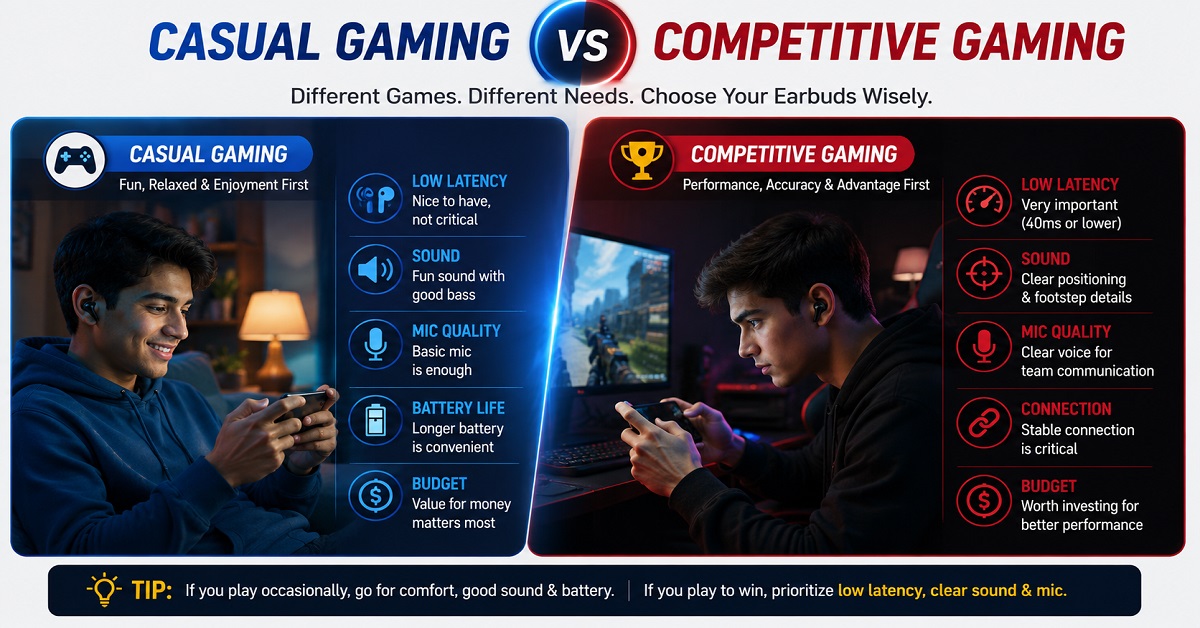
Casual gaming vs competitive gaming
This distinction is important.
If you occasionally play games such as:
- Candy Crush
- Subway Surfers
- Casual racing games
- Puzzle games
- Strategy games
you probably don’t need to spend extra money just to get the lowest possible latency.
But if you regularly play competitive games where audio cues matter, such as multiplayer shooters, a good low-latency mode becomes more valuable.
Sound positioning matters too
Latency isn’t the only thing that matters for gaming.
You also want to hear where sounds are coming from.
For example, in a game, you may need to distinguish between:
- Footsteps from the left
- Footsteps from the right
- Gunfire in the distance
- Vehicle sounds
- Environmental sounds
This is where soundstage and separation become useful.
A pair of earbuds with an extremely bass-heavy sound signature may make explosions enjoyable but could make smaller positional details less distinct.
For competitive gaming, balanced sound and good separation can therefore be more useful than simply having huge bass.
Don’t forget the microphone
If you play multiplayer games with voice chat, microphone quality matters too.
You may need to communicate with teammates while there is game audio playing in the background.
Therefore, a good gaming earbud should ideally offer:
- Low latency
- Good sound positioning
- Clear microphone
- Stable Bluetooth connection
- Comfortable fit
You don’t necessarily need every gaming feature if you only play casually.
How to Choose Earbuds for Music
Music is probably the most personal use case of all.
There is no single sound signature that everyone will like.
One person may want powerful bass.
Another may prefer natural vocals.
Someone else may want bright and detailed treble.
Therefore, don’t let a manufacturer simply tell you that an earbud has “amazing sound.”
Try to understand what kind of sound it is designed to produce.
Bass
Bass controls the low-frequency part of the sound.
Good bass can make:
- Drums sound powerful
- Electronic music more energetic
- Hip-hop more enjoyable
- Movie sound effects more impactful
But too much bass can make music sound muddy.
If the bass is overpowering the vocals and instruments, you may lose some of the details in a song.
Mids and vocals
The midrange is particularly important for vocals and many instruments.
If you frequently listen to:
- Podcasts
- Acoustic music
- Interviews
- Classical music
- Vocal-heavy songs
you may prefer earbuds with a balanced midrange rather than extremely boosted bass.
Treble
Treble adds detail and brightness to the sound.
Good treble can make instruments and vocals feel more detailed.
But excessive treble can make music sound harsh, especially at higher volume.
This is why a balanced tuning is often a safer choice for someone who listens to many different types of music.
EQ can make a big difference
Some earbuds come with an app that allows you to change the EQ.
For example, you might have presets such as:
- Bass Boost
- Balanced
- Vocal
- Classical
- Rock
Some apps also let you manually adjust different frequency ranges.
This can be extremely useful because you don’t have to accept the manufacturer’s default sound.
For example:
Watching movies: Slightly stronger bass + clear vocals
Listening to podcasts: Vocal-focused EQ
Electronic music: Bass-focused EQ
Classical music: More balanced tuning
This flexibility can sometimes be more useful than a specification such as driver size.
How Important Are Bluetooth Codecs for Music?
You may come across terms such as SBC, AAC, LDAC, aptX and LC3 while comparing earbuds.
These are Bluetooth audio codecs. They determine how audio is encoded and transmitted wirelessly between your device and the earbuds.
Some codecs can support higher-quality audio or lower latency than others.
But there is an important catch.
Both your source device and your earbuds need to support the codec for you to use it.
For example, buying LDAC-compatible earbuds doesn’t automatically mean that every phone will use LDAC with them.
You may also need to enable the codec in your phone settings or use an app that supports the required audio quality.
More importantly, codec support doesn’t automatically make an earbud sound good.
A well-tuned earbud using a basic codec can still sound more enjoyable to you than a poorly tuned earbud with a more advanced codec.
So treat codec support as one part of the buying decision, not the entire decision.
How to Choose Earbuds for the Gym
Gym users have a different set of priorities.
When you’re sitting at a desk, an earbud that moves slightly may not be a major problem.
When you’re running, lifting weights or doing a workout, it can become extremely annoying.
Your earbuds need to stay securely in your ears while you move.
Fit should be your first priority
For gym use, I would put fit ahead of several impressive specifications.
An earbud with excellent ANC and sound quality is not a good workout earbud if it keeps falling out.
Look for:
- Secure in-ear fit
- Appropriate ear-tip sizes
- Lightweight design
- Good grip
- Comfortable shape
If you’re buying online, pay close attention to customer comments about fit.
Repeated comments such as “falls out while running” are worth considering.
Check the IP rating
If you’re buying earbuds for workouts, don’t ignore the IP rating.
An IP rating tells you how well a device is protected against things such as dust and water under specified testing conditions.
For example, you may see ratings such as:
- IPX4
- IPX5
- IP55
- IP57
The letters and numbers have specific meanings.
The important thing for a gym user is to understand that water resistance is not the same as being waterproof.
Sweat, splashes and accidental exposure to water are different from deliberately submerging your earbuds.
So don’t assume that an IP-rated pair can be safely used while swimming.
IPX4 vs IPX5: Is the higher number always better?
Not necessarily in the way buyers sometimes assume.
The first number relates to solid-particle protection, while the second number relates to water protection.
An “X” means that the product has not been given a rating for that particular category.
Therefore, an IPX4 rating and an IP55 rating shouldn’t be compared simply by looking at which number is bigger.
For gym use, look for a product that provides a suitable level of sweat and water protection for your activity and follow the manufacturer’s usage instructions.
Don’t forget cleaning and hygiene
This is something many earbud buying guides completely ignore.
If you use earbuds during workouts, sweat and earwax can accumulate around the ear tips and speaker mesh.
That can affect hygiene and potentially affect sound quality over time.
After workouts, wipe the earbuds with an appropriate dry or slightly damp soft cloth according to the manufacturer’s cleaning instructions.
Don’t put wet earbuds directly into their charging case.
And don’t use excessive water or cleaning liquid around the speaker openings.
Battery life matters at the gym too
You probably don’t need 60 or 80 hours of battery life just for workouts.
But having enough battery for several sessions without constantly charging the case is convenient.
Fast charging can be particularly useful.
For example, if you’re about to leave for the gym and discover that your earbuds are almost empty, a short charging session can give you enough playback for your workout.
What About Earbuds for Running Outdoors?
Running introduces another factor that gym users may not think about:
awareness of your surroundings.
If you run near roads or in places with other pedestrians and vehicles, being able to hear what is happening around you can be important.
Traditional sealed in-ear earbuds with strong passive isolation or ANC can reduce outside sound considerably.
For some runners, open-ear earbuds may therefore be worth considering because they allow more awareness of surrounding sounds.
This doesn’t mean open-ear earbuds are automatically safer in every situation. You should still remain alert and use appropriate judgment around traffic and other hazards.
If you’re interested in this design, you can read our Best Open-Ear Earbuds Under ₹5,000 in India guide to understand the available options.
Which Features Matter Most for Each Use?
At this point, you may be wondering how all these specifications fit together.
Here’s a simple way to think about it:
| Main use | Most important features | Features that are less important |
|---|---|---|
| Calling | Microphone, voice clarity, noise reduction | Very large drivers |
| Gaming | Low latency, sound positioning, microphone | Extremely long battery |
| Music | Sound tuning, EQ, comfort, codec | Gaming mode |
| Gym | Fit, IP rating, comfort, battery | LDAC |
| Movies | Dialogue, soundstage, ANC, comfort | Extremely low gaming latency |
| Travel | ANC, battery, comfort | Gaming features |
| Office | Microphone, comfort, multipoint | Strong bass |
| Everyday use | Balanced sound, comfort, battery | Specialized gaming features |
This table shows why there is no single “best” earbud for everyone.
A feature that is extremely useful for one person can be almost irrelevant to another.
Should You Buy One Pair for Everything?
For many people, yes.
If you listen to music, make calls, watch YouTube, occasionally play games and exercise a few times a week, a good all-round TWS earbud can handle all of these tasks reasonably well.
Look for a balanced combination of:
- Good sound
- Clear microphones
- Comfortable fit
- Reliable connectivity
- Decent battery life
- Useful ANC
- Some water resistance
- Low-latency mode if you game
You don’t need the absolute best specification in every category.
But if one activity dominates your usage, it can be smarter to prioritize that activity.
For example, someone who spends five hours a day on calls should probably prioritize microphone quality and comfort over LDAC.
Someone who spends two hours every day gaming should give more importance to latency and sound positioning.
And someone who spends an hour at the gym every day should care more about secure fit and water resistance.
The best buying decision starts with your habits, not the specification sheet.
Earbud Features You Should Understand Before Buying
By now, you should have a basic idea of which features matter for calling, gaming, music and workouts.
But there is another problem when shopping for earbuds.
Manufacturers use many technical terms that can make two products look completely different on paper, even when the difference may not be very important for your actual use.
Terms such as ANC, ENC, Bluetooth 5.4, LDAC, Spatial Audio, multipoint and low latency can be useful, but only when you understand what they actually do.
Let’s break down the most important ones in simple terms.
ANC vs ENC: What Is the Difference?
ANC and ENC are often confused because both are related to noise.
But they solve different problems.
ANC reduces noise you hear
ANC stands for Active Noise Cancellation.
It uses microphones to detect external sounds and electronic processing to reduce certain unwanted noises before you hear them.
ANC is particularly useful for continuous sounds such as:
- Bus and train noise
- Aircraft engine noise
- Air conditioners
- Fans
- Traffic sounds
- General background noise
For example, if you’re sitting on a bus and listening to music, ANC can reduce the constant engine and road noise around you.
This allows you to hear your audio more clearly without necessarily increasing the volume.
If you want to understand ANC in greater detail, read our What Is ANC in Headphones and How Does It Work? article.
ENC helps with calls
ENC generally refers to Environmental Noise Cancellation, and it is mainly associated with microphone processing during calls.
The goal is to reduce unwanted environmental sounds picked up by the microphones so that the other person can hear your voice more clearly.
For example, imagine you’re talking to someone while walking outside.
You can hear the other person through your earbuds.
At the same time, your earbuds’ microphones are picking up traffic, wind and other environmental sounds.
The microphone noise-reduction system attempts to separate your voice from those sounds.
The simple way to remember it
ANC = improves what you hear.
ENC/microphone noise cancellation = helps improve what the other person hears.
This distinction is particularly important if you’re buying earbuds mainly for phone calls.
Also remember that having “AI ENC” or “AI noise cancellation” written on the product page doesn’t guarantee excellent call quality.
Microphone placement, software processing, wind handling and the actual implementation all matter.
How Important Is the Bluetooth Version?
You will frequently see earbuds advertised with:
Bluetooth 5.2
Bluetooth 5.3
Bluetooth 5.4
and newer versions as technology develops.
It is tempting to assume that Bluetooth 5.4 must automatically provide better sound than Bluetooth 5.3.
That’s not necessarily true.
The Bluetooth version is only one part of the complete wireless system.
Your actual experience also depends on:
- The phone or computer you’re using
- Bluetooth profiles
- Supported audio codecs
- Earbud hardware
- Software
- Connection environment
- Distance between the earbuds and source device
So if you’re choosing between two earbuds, don’t reject one simply because it has Bluetooth 5.3 while another has Bluetooth 5.4.
Look at the complete feature set.
Does Bluetooth 5.4 mean better sound?
No, not by itself.
Sound quality is influenced by the drivers, tuning, codec, amplification, software processing and other parts of the audio system.
A well-tuned Bluetooth 5.3 earbud can sound better to you than a poorly tuned Bluetooth 5.4 model.
This is another example of why specification numbers should not be the only deciding factor.
Bluetooth Codecs: SBC, AAC, LDAC and More
A Bluetooth codec determines how audio is encoded and transmitted wirelessly from your phone or other source device to your earbuds.
You may encounter codecs such as:
- SBC
- AAC
- LDAC
- aptX
- LC3
Some codecs are designed to support higher data rates, while others may focus on efficiency or newer Bluetooth audio features.
But there is one important rule:
The source device and earbuds both need to support a particular codec for you to use it.
For example, buying earbuds with LDAC support doesn’t automatically mean you’ll always be listening through LDAC.
The phone must support it, the earbuds must support it, and the relevant settings may need to be enabled.
Is LDAC necessary?
For most buyers, no.
LDAC can be useful if you have compatible hardware and care about higher-quality Bluetooth music playback.
But if you’re mainly buying earbuds for:
- Phone calls
- YouTube
- Casual listening
- Gym workouts
- Gaming
you shouldn’t choose a product solely because it has LDAC.
Sound tuning and overall performance can have a much bigger effect on your everyday experience.
What Is Multipoint Connectivity?
Multipoint connectivity allows compatible earbuds to maintain connections with two devices and switch between them more conveniently.
Imagine you’re working on your laptop while your phone is nearby.
Your earbuds are connected to both.
You’re watching a YouTube video on your laptop when a phone call comes in.
With suitable multipoint support, the earbuds can switch to the phone for the call and then return to the laptop afterward.
This can be extremely useful for people who use earbuds for both work and personal activities.
Common combinations include:
Laptop + smartphone
Tablet + smartphone
Work computer + personal phone
This is one of those features that you may not care about until you actually start using it.
If you regularly switch between two devices, multipoint can save you from repeatedly opening Bluetooth settings and manually reconnecting your earbuds.
You can learn more about how the technology works in our What Is Bluetooth Multipoint Connectivity and How Does It Work? guide.
Is multipoint worth paying extra for?
If you regularly use two devices, yes, it can be very useful.
If you only connect your earbuds to one phone, you probably don’t need to spend extra money just to get multipoint.
Again, it comes down to your usage.
What Is Spatial Audio?
Spatial Audio is another feature that has become common in newer earbuds.
In simple terms, spatial audio processing attempts to make sound feel more three-dimensional rather than simply coming from the left and right earbuds.
Instead of the sound feeling like it is directly inside your ears, the processing can create the impression of a wider or more surrounding sound field.
This can be particularly interesting for:
- Movies
- TV shows
- Compatible music
- Gaming
However, the experience varies significantly between products.
Some implementations are basic software effects.
Others can use more advanced processing and even head tracking, where the perceived position of the sound changes as you move your head.
Is Spatial Audio necessary?
No.
It is a nice feature, but it shouldn’t be the first thing you look for when buying earbuds.
If an earbud has excellent sound quality, good fit and reliable microphones but doesn’t offer Spatial Audio, it can still be a much better choice for you than a model with Spatial Audio but poor comfort or weak call quality.
Also, compatibility matters.
Some spatial-audio features may work only with particular phones, operating systems or supported content.
So always check compatibility before assuming you’ll get the same experience on every device.
What Is EQ and Why Does It Matter?
EQ stands for equalizer.
It allows you to adjust different parts of the sound.
For example, you can increase or reduce:
- Bass
- Midrange
- Treble
Some earbud apps provide simple presets.
You might see options such as:
Bass Boost
Balanced
Vocal
Bright
Movie
Other apps allow you to manually adjust the frequency bands.
Why EQ can be useful
Imagine you buy earbuds and find that the bass is slightly too strong.
Instead of returning the earbuds, you may be able to reduce the bass using the app.
Or perhaps you’re watching a YouTube tutorial and find that the speaker’s voice isn’t prominent enough.
A vocal-focused EQ preset may improve the experience.
This is why app support and EQ flexibility can sometimes be more useful than one impressive specification on the product box.
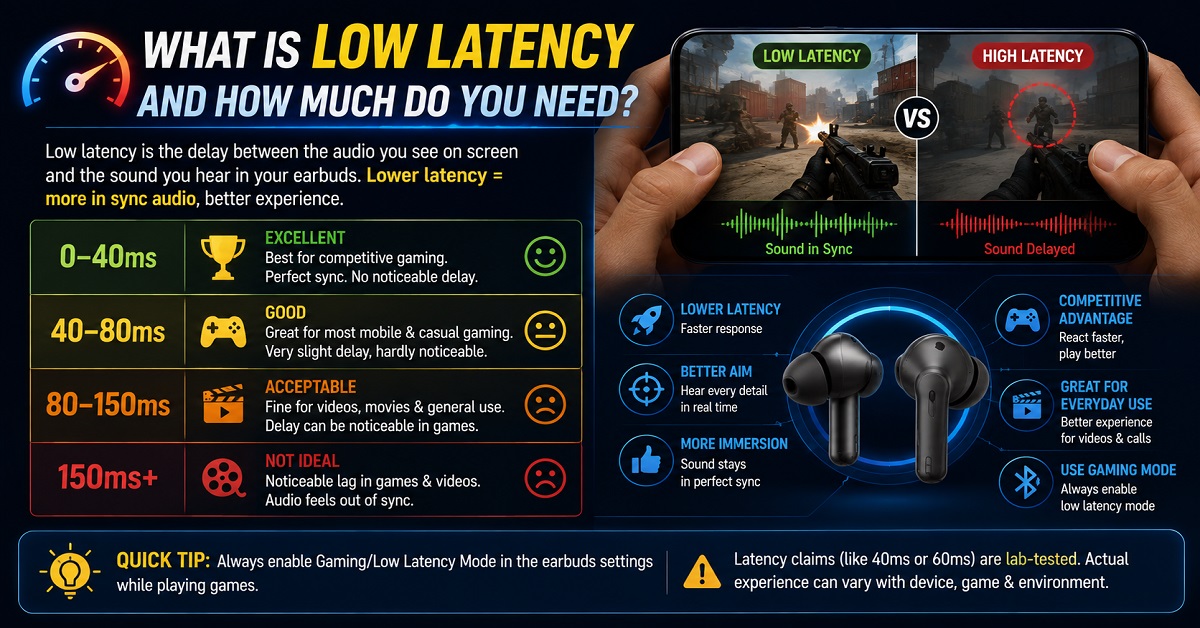
What Is Low Latency and How Much Do You Need?
We’ve already discussed latency for gaming, but it’s worth looking at this feature in more detail because manufacturers often highlight extremely low numbers.
You might see:
40ms
45ms
47ms
60ms
or other claimed figures.
Generally, lower latency means less delay between the source device and the earbuds.
But don’t treat these numbers as directly comparable across every brand.
Manufacturers may use different testing conditions, and the actual experience depends on the phone, game and connection.
For gaming
Low latency is more important.
If you play competitive games where you rely on sound cues, choose earbuds with a dedicated gaming or low-latency mode.
For YouTube and movies
Latency is usually less important.
Your device and video application can often compensate for audio delay.
So don’t spend an extra ₹1,000 simply to move from a claimed 60ms latency to 40ms if you mainly watch Netflix and YouTube.
For casual gaming
A low-latency mode is nice to have but doesn’t need to be your biggest priority.
IP Ratings: Important for Gym and Outdoor Use
If you’re buying earbuds for workouts, you’ll probably encounter IP ratings.
An IP rating describes protection against things such as solid particles and water under defined testing conditions.
You might see:
IPX4
IPX5
IP55
IP57
These ratings are not just random numbers.
The first digit relates to protection against solid particles such as dust.
The second digit relates to water protection.
When you see an X, it means a rating hasn’t been specified for that particular category.
Why the IP rating matters
Consider someone who uses earbuds for a 45-minute gym session every day.
They may sweat heavily during workouts.
A pair with suitable water resistance is a better choice than a model with no stated protection.
But remember:
Water resistance does not mean waterproof.
Even a product with a strong IP rating should be used according to the manufacturer’s instructions.
Don’t assume that an IP-rated earbud can be used for swimming or deliberately submerged in water.
What about charging?
This is another important point.
Even if the earbuds themselves have water resistance, the charging case may have different protection or no water-resistance rating at all.
Never put wet earbuds into a charging case.
Allow them to dry properly according to the manufacturer’s instructions.
Battery Life: Don’t Get Fooled by the Biggest Number
Battery life is important, but manufacturers usually advertise the maximum possible playback figure under specific conditions.
For example, a product may claim:
60 hours of playback
But that doesn’t necessarily mean you’ll get 60 hours with ANC enabled at high volume.
Battery consumption can change depending on:
- ANC
- Transparency mode
- Volume
- Codec
- Spatial Audio
- Calls
- Gaming mode
- Other processing features
How much battery life do you actually need?
For most users, even 30-40 hours of total playback with the charging case can be enough.
If you listen for two hours every day, that can provide many days of use before you need to recharge the case.
If you travel frequently, longer battery life becomes more valuable.
Fast charging can be more useful than huge battery numbers
Consider this situation.
You’re leaving home in 15 minutes and discover that your earbuds are almost empty.
An earbud that provides several hours of playback after a short charging session can be more useful than another model that has a larger maximum battery figure but slower charging.
So when comparing battery life, look at both:
Total playback + fast charging
Comfort Is a Feature, Not a Bonus
Many buyers spend a lot of time comparing specifications but almost no time thinking about comfort.
That’s a mistake.
If you’re using earbuds for several hours every day, comfort becomes one of the most important features.
What affects comfort?
Several things can make a difference:
- Earbud weight
- Shape
- Ear-tip material
- Ear-tip size
- How deeply it sits in your ear
- Pressure
- Stem length
- Overall design
This is also why you should be careful when relying on someone else’s review.
If one reviewer says:
“These are the most comfortable earbuds I’ve ever used.”
that doesn’t guarantee they will feel the same in your ears.
Everyone’s ears are different.
Ear-tip fit affects sound too
Fit isn’t only about comfort.
A proper seal can also affect:
- Bass response
- Passive noise isolation
- ANC performance
- Overall sound quality
If the ear tip is too small, the earbuds may feel loose and bass may sound weak.
If it is too large, the earbuds may create uncomfortable pressure.
That’s why trying the different ear-tip sizes included in the box can make a significant difference.
Should You Choose Stem or Stemless Earbuds?
You’ll find both designs on the market.
Some TWS earbuds have a small stem extending downward from the earbud.
Others have a rounded or compact stemless design.
Neither design is automatically better.
The shape can affect:
- Fit
- Microphone positioning
- Comfort
- Controls
- Appearance
For calling, microphone placement can be particularly important.
For gym use, the most important factor is whether the shape stays securely in your ears while moving.
So don’t choose stem vs stemless based purely on appearance.
Touch Controls Are More Useful Than They Seem
Touch controls can make everyday use much easier.
You may be able to:
- Play/pause music
- Skip tracks
- Answer calls
- Reject calls
- Activate ANC
- Switch between modes
- Activate voice assistants
But overly sensitive controls can also become annoying.
For example, if you frequently adjust the earbuds in your ears, accidental touches can pause your music or change the ANC mode.
If possible, look for an earbud app that lets you customize the touch controls.
This allows you to configure the earbuds around your own habits.
App Support Can Make a Good Earbud Better
The hardware is only part of the experience.
Many modern earbuds come with companion apps that allow you to:
- Change EQ
- Customize controls
- Update firmware
- Adjust ANC
- Enable gaming modes
- Check battery levels
- Find earbuds
- Manage connected devices
A good app can extend the usefulness of your earbuds long after you purchase them.
But there is one thing to remember.
Check whether the app is compatible with your phone.
Some features may be available only on Android or only on particular brand smartphones.
Should You Buy Brand-Matched Earbuds?
If you already use a smartphone from brands such as OnePlus, Samsung, Xiaomi, realme or OPPO, you may notice that their earbuds often offer additional ecosystem features.
These can include:
- Faster pairing
- Device switching
- Special audio effects
- Spatial Audio
- Additional EQ options
- Battery information
- Advanced controls
That doesn’t mean you must buy earbuds from the same brand as your phone.
A different brand can offer better sound or value.
But if two products are similarly priced and one offers noticeably better integration with your phone, that can be a useful deciding factor.
Don’t Pay Extra for Features You Won’t Use
This is one of the most important rules in this entire guide.
Manufacturers can put a huge number of features into a single pair of earbuds.
You might see:
ANC + LDAC + Spatial Audio + gaming mode + multipoint + AI calls + 60-hour battery + Hi-Res Audio
It looks impressive.
But ask yourself:
How many of these features will I actually use?
If you mostly use your earbuds at home for YouTube and music, you may not need the strongest ANC.
If you never play games, you don’t need to prioritize 40ms latency.
If you only use one phone, multipoint may not matter.
If you mainly listen to podcasts, LDAC may be much less important than clear vocals and comfortable fit.
Paying for features you don’t use is one of the easiest ways to overspend on earbuds.
How to Check Whether an Earbud Is Actually Good
Specifications are useful for narrowing down your choices.
But before buying, try to find information about real-world performance.
Look for reviews that discuss:
Sound
Does the reviewer describe the sound as bass-heavy, balanced, bright, warm or vocal-focused?
Calling
Can the other person hear the voice clearly?
Does the microphone handle traffic and wind?
Comfort
Can the earbuds be worn comfortably for one or two hours?
Battery
Does real-world battery life seem close to the manufacturer’s claim?
Connectivity
Do users report random disconnections or one earbud failing to connect?
App
Is the companion app reliable and useful?
Durability
Are there repeated complaints about charging problems, battery degradation or one earbud stopping?
This type of information can be more valuable than a product page filled with specifications.
Don’t Let One Negative Review Scare You
You may find a product with thousands of positive reviews and a few negative ones.
That doesn’t necessarily mean you should avoid it.
Electronic products can sometimes have individual defective units.
Instead, look for patterns.
If one customer says:
“My left earbud stopped working.”
that could be an isolated problem.
But if dozens of customers independently report the same issue, you should investigate further.
The same applies to:
- Battery drain
- Poor microphone
- Bluetooth disconnections
- Charging case problems
- Fit
- App crashes
Repeated complaints deserve more attention than isolated complaints.
A Simple Rule for Comparing Two Earbuds
If you’re stuck between two models, don’t compare every specification.
Instead, write down your three most important requirements.
For example:
User A:
- Clear calls
- Comfortable for long use
- Multipoint
User B:
- Strong bass
- ANC
- Long battery
The same two earbuds could produce completely different winners for these two people.
This is why the right question isn’t:
“Which earbud is better?”
The better question is:
“Which earbud is better for me?”
That mindset can help you avoid spending more money simply because another model has a longer specification sheet.
How to Choose the Right Earbuds for You
We have covered the individual features, but you may still be wondering how to put everything together when you’re actually ready to buy.
You don’t need to compare 20 specifications for every earbud.
A better approach is to start with your usage, identify your most important features, set a realistic budget and then compare a few suitable models.
Here is a simple step-by-step method.
Step 1: Identify Your Main Use Case
Start by deciding what you will do most often with your earbuds.
| If you mainly use earbuds for | Prioritize these features |
|---|---|
| Phone calls | Microphone quality, voice clarity, noise reduction |
| Gaming | Low latency, sound positioning, microphone |
| Music | Sound tuning, EQ, comfort, codec support |
| Gym | Secure fit, IP rating, comfort, battery |
| Movies | Dialogue clarity, soundstage, ANC, comfort |
| Travel | ANC, comfort, battery life |
| Office work | Microphone, comfort, multipoint |
| General everyday use | Balanced sound, comfort, battery, reliability |
This simple table can save you from getting distracted by features you may never use.
For example, if your main goal is taking work calls, microphone quality should come before LDAC.
If you mainly listen to music at home, sound tuning should probably matter more than a gaming mode.
If you spend an hour at the gym every day, fit and sweat resistance are more important than having the longest possible battery life.
Step 2: Think About Where You Will Use Them
Your environment can be just as important as your use case.
Consider these situations.
Quiet bedroom
If you mainly use earbuds in a quiet room, you may not need powerful ANC.
You can put more of your budget toward sound quality, comfort and battery life.
Busy office
For office use, microphone quality becomes important if you attend frequent meetings.
Multipoint can also be very useful if you regularly switch between your work laptop and smartphone.
Bus or train
ANC becomes much more valuable here.
Continuous engine and road noise can make listening less enjoyable, especially when you’re trying to hear quiet dialogue or podcasts.
Gym
A secure fit and suitable water resistance should be priorities.
You don’t want to spend money on premium earbuds only to find that they keep slipping out during workouts.
Outdoor running
Think about your surroundings.
If you run near roads, being able to hear what is happening around you may be important. Open-ear designs can be worth considering for some users because they don’t block the ear canal in the same way as traditional in-ear earbuds.
Step 3: Set Your Budget Before Looking at Products
It’s easy to start with a ₹2,000 budget and end up looking at ₹5,000 earbuds after seeing a few extra features.
Set your budget first.
Then ask:
“Which features matter most within my budget?”
You don’t necessarily need to spend more to get a good pair of earbuds.
Under ₹1,000
At this price, focus on the basics:
- Comfortable fit
- Acceptable sound
- Reliable connection
- Reasonable battery life
- Basic call quality
Don’t expect every premium feature.
₹1,000 to ₹2,000
This is where you can start finding more capable TWS earbuds with better sound, longer battery life and additional features.
Some models may offer basic ANC, gaming modes or app support.
This range can be particularly attractive for people who want good everyday earbuds without spending too much.
₹2,000 to ₹3,000
This is a very competitive price range.
You can find earbuds offering combinations of:
- Hybrid ANC
- Larger drivers
- Spatial Audio
- LDAC
- Multipoint
- Better microphones
- Low-latency modes
- Long battery life
However, don’t assume every model in this range is better than everything below ₹2,000.
Look at what you actually need.
₹3,000 to ₹5,000
Moving into this range can give you better overall tuning, ANC, app features and build quality on some models.
But the improvement isn’t necessarily equal across every product.
A well-tuned ₹2,500 earbud can be a better purchase for you than a poorly matched ₹4,500 model.
Above ₹5,000
At higher prices, you’re often paying for improvements in areas such as:
- Sound quality
- ANC
- Microphones
- Build quality
- Ecosystem features
- App experience
- Premium codecs
- Spatial audio
- Overall refinement
But again, don’t assume that a higher price automatically guarantees a better experience.
Step 4: Decide Which Three Features Matter Most
This is one of the easiest ways to narrow your choices.
Write down your top three requirements.
For example:
For a work-from-home user:
- Clear microphone
- Comfortable fit
- Multipoint
For a music listener:
- Sound quality
- EQ
- Comfort
For a gamer:
- Low latency
- Sound positioning
- Microphone
For a gym user:
- Secure fit
- Water resistance
- Battery life
Once you have these three priorities, product comparison becomes much easier.
If one earbud has every feature but performs poorly in your top three areas, it probably isn’t the right choice.
Step 5: Check Device Compatibility
Before buying, check whether the important features work with your phone, tablet or computer.
This is particularly important for advanced features.
For example:
- A codec may not be supported by your phone.
- Spatial Audio may require a compatible device.
- Some app features may be limited to Android.
- Certain ecosystem features may work best with the manufacturer’s own smartphones.
- Multipoint behavior can vary between devices.
Don’t assume that every feature listed on the box will work in exactly the same way with every device.
If you use an iPhone, Android phone, Windows laptop and tablet together, compatibility becomes even more important.
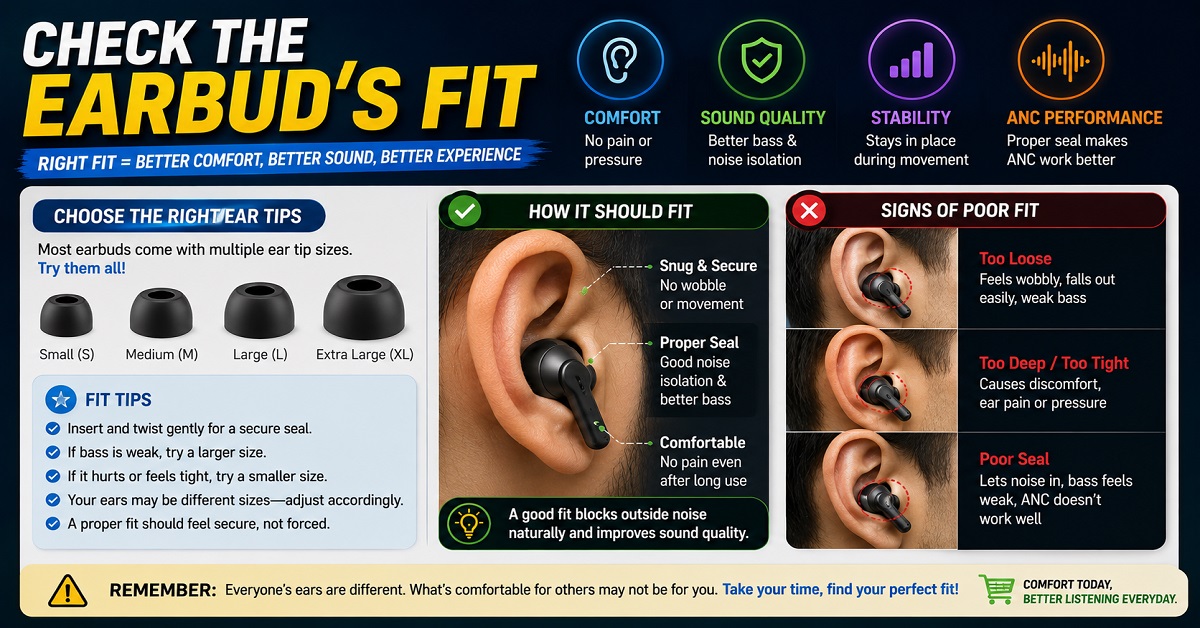
Step 6: Check the Earbud’s Fit
If possible, look for information about the fit before buying.
Customer reviews can be helpful here.
Look for repeated comments such as:
- “Falls out while running”
- “Comfortable for long hours”
- “Causes ear pain”
- “Good for small ears”
- “Doesn’t fit securely”
Remember that fit is personal.
A product with hundreds of positive comfort reviews may still not fit your ears properly.
If the package includes different ear-tip sizes, try them rather than immediately assuming the pre-installed tips are right for you.
Step 7: Check Real-World Reviews
Specifications tell you what the manufacturer claims.
Reviews can tell you what happens when people actually use the product.
When researching earbuds, look for reviews that cover the specific things you care about.
For calling
Look for microphone samples and comments about outdoor calls.
For gaming
Look for real-world latency testing rather than relying only on the advertised number.
For music
Look for descriptions of bass, vocals, treble and overall tuning.
For gym
Look for long-term comments about fit and sweat resistance.
For battery
Look for actual usage reports rather than only the maximum number printed on the product page.
This is one reason we include customer feedback when reviewing earbuds on AudioPick.
Common Mistakes to Avoid When Buying Earbuds
Even after understanding all the features, buyers can still make a few common mistakes.
Mistake 1: Choosing the biggest driver
A 13mm driver doesn’t automatically sound better than a 10mm driver.
Driver size is only one part of sound quality.
Mistake 2: Choosing the highest ANC number
50dB ANC isn’t automatically twice as good as 25dB ANC.
Real-world ANC performance depends on the implementation, type of noise and fit.
Mistake 3: Buying based only on battery life
If you rarely use earbuds for more than two hours at a time, you may not need an 80-hour battery.
Comfort and sound may be more important.
Mistake 4: Ignoring microphone quality
If you take regular calls, don’t assume good music quality means good call quality.
They are separate parts of the product.
Mistake 5: Ignoring fit
The most advanced earbuds in the world won’t help if they don’t stay in your ears.
Mistake 6: Assuming Bluetooth 5.4 means better sound
Bluetooth version and sound quality are not the same thing.
Look at codecs, tuning, drivers and the complete audio system.
Mistake 7: Paying for features you won’t use
Don’t buy expensive earbuds just because the product page contains a long list of features.
Choose according to your actual habits.
Mistake 8: Ignoring your phone
Some features may work differently depending on your smartphone.
Check compatibility before buying.
Mistake 9: Buying gym earbuds without checking water resistance
Sweat can be a problem for earbuds that don’t have suitable protection.
Check the IP rating and manufacturer’s instructions.
Mistake 10: Looking only at the average star rating
A 4.3-star product isn’t automatically better than a 4.1-star product.
Read the negative reviews and look for repeated complaints.
One Pair for Everything or Two Different Pairs?
This is a question many regular earbud users eventually ask.
Should you buy one expensive pair that does everything, or buy two cheaper pairs for different purposes?
There isn’t one correct answer.
Buy one pair if…
A single pair makes sense if you:
- Want simplicity
- Don’t want to carry multiple charging cases
- Have a moderate budget
- Use earbuds for several different tasks
- Don’t have highly specialized requirements
For example, a good all-round pair can handle calls during the day, music during your commute and YouTube at night.
Consider two pairs if…
Two pairs can make sense if your requirements are very different.
For example:
Pair 1: Premium earbuds for calls, music and travel
Pair 2: Affordable, secure earbuds for gym workouts
This approach can also reduce wear on your more expensive pair.
You don’t necessarily need two expensive pairs.
A good ₹2,000-₹3,000 everyday pair combined with an affordable workout pair may be more practical than buying one ₹10,000 pair and exposing it to heavy sweat every day.
What Is the Best Earbud Setup for Different Users?
Here is a quick way to decide.
For office workers
Look for:
Good microphones + comfort + multipoint + reliable battery
ANC is useful if your workplace is noisy.
For students
Look for:
Good sound + comfort + battery + useful ANC
If you also play mobile games, a low-latency mode is a useful bonus.
For music lovers
Look for:
Good tuning + EQ + comfort + codec support
Don’t choose purely based on driver size.
For gamers
Look for:
Low latency + good positioning + microphone + stable connection
For gym users
Look for:
Secure fit + suitable IP rating + comfort + battery
For frequent travellers
Look for:
Good ANC + comfort + battery + fast charging
For people who want one pair for everything
Look for:
Balanced sound + good microphones + ANC + comfort + battery + reliable connectivity
This is probably the most difficult category because you are asking one product to perform several different jobs.
Our Simple Earbuds Buying Checklist
Before you click the Buy Now button, run through this checklist:
1. What will I use them for most?
Calling, gaming, music, gym, movies or general use?
2. Where will I use them?
At home, office, gym, outdoors or while travelling?
3. What are my top three features?
Write them down.
4. Does the earbud fit my budget?
Don’t increase your budget simply because another product has more features.
5. Does it work properly with my phone?
Check codecs, app support and ecosystem features.
6. Is it comfortable?
Look for fit feedback and available ear-tip sizes.
7. Does it have suitable water resistance?
Especially important for gym and outdoor use.
8. How good is the microphone?
Important if you take calls or attend meetings.
9. Is the battery enough for my usage?
Look at both total battery life and fast charging.
10. What do real users complain about?
Look for repeated problems rather than isolated negative reviews.
If a product passes these ten checks, you are much less likely to regret the purchase.
Our Final Verdict
There is no single pair of earbuds that is perfect for every person.
The right choice depends on what you do, where you do it and which features you actually care about.
If calling is your priority, focus on microphone quality and noise handling.
If gaming is your main activity, look at latency, sound positioning and microphone performance.
If music is most important, pay attention to sound tuning, bass, vocals, treble, EQ and comfort.
For gym use, fit, water resistance and comfort should come first.
For movies and YouTube, look for clear dialogue, balanced sound, good soundstage, useful ANC and comfortable fit.
And if you want one pair for everything, focus on getting a balanced all-rounder rather than the product with the longest specification list.
Most importantly, don’t let marketing numbers make the decision for you.
A bigger driver isn’t automatically better.
A higher ANC number isn’t automatically better.
Bluetooth 5.4 isn’t automatically better-sounding.
A 60-hour battery doesn’t matter much if the earbuds hurt your ears.
And LDAC isn’t particularly useful if your phone doesn’t support it.
Choose earbuds based on your actual habits first, then use specifications to narrow down the options.
That approach will usually help you spend your money more wisely.
FAQs About Choosing Earbuds
1. How do I choose the right earbuds?
Start by identifying your main use. For calling, prioritize microphone quality and voice clarity. For gaming, look for low latency and good sound positioning. For music, focus on sound tuning and EQ. For gym use, prioritize fit, comfort and water resistance.
What features should I look for when buying earbuds?
The most important features depend on your usage, but sound quality, comfort, fit, battery life, microphone quality, connectivity and durability are generally important. ANC, Spatial Audio, multipoint and low latency are useful depending on your needs.
3. Are expensive earbuds always better?
No. More expensive earbuds can offer better sound, ANC, microphones or additional features, but that doesn’t mean they are automatically better for you. A cheaper model may be a better choice if it matches your requirements.
4. Is a bigger driver always better in earbuds?
No. Driver size is only one factor affecting sound quality. Tuning, driver construction, enclosure design and software processing also influence the final sound. A smaller, well-tuned driver can sound better than a larger, poorly tuned one.
5. Do I need ANC for everyday use?
Not necessarily. ANC is particularly useful for travel, busy offices and other noisy environments. If you mostly use earbuds in quiet surroundings, you may prefer spending your money on sound quality, comfort or other features instead.
6. What earbuds are best for calling?
Look for earbuds with good microphones, effective microphone noise reduction, wind-noise handling and comfortable fit. Don’t judge call quality based only on the number of microphones.
7. What should I look for in gaming earbuds?
Prioritize low latency, good sound positioning, a clear microphone and a stable connection. For competitive gaming, low latency is more important than it is for casual gaming.
8. Are TWS earbuds good for the gym?
Yes, provided they have a secure fit and suitable water or sweat resistance. Check the IP rating and make sure the earbuds stay securely in your ears during movement.
9. Is Bluetooth 5.4 better than Bluetooth 5.3 for sound quality?
Not necessarily. Bluetooth version alone doesn’t determine sound quality. The codec, drivers, tuning, software and source device also affect the listening experience.
10. Is LDAC necessary for good music quality?
No. LDAC can provide higher-quality Bluetooth transmission when supported by both the source device and earbuds, but it isn’t essential for enjoyable music. Sound tuning and overall earbud quality remain very important.
11. Is Spatial Audio worth paying extra for?
It depends on how you use your earbuds. Spatial Audio can make compatible movies, music and games feel more immersive, but it isn’t essential. Don’t choose it over better sound quality, comfort or microphone performance if those are more important to you.
12. How much should I spend on earbuds?
There is no universal amount. Start with your budget and identify your most important features. There are useful options at lower prices, while spending more can provide improvements in sound, ANC, microphones and other features. The best value depends on your needs.
Quick Takeaway
What to prioritize:
- Choose earbuds according to your main use case
- Prioritize comfort and fit for long listening sessions
- Check microphone quality if you make frequent calls
- Look for low latency if you play competitive games
- Check the IP rating for gym and outdoor use
- Consider ANC when you regularly use earbuds in noisy places
- Check device and app compatibility before buying
Things to avoid:
- Choosing only because of a larger driver
- Assuming a higher ANC number guarantees better performance
- Buying expensive features you won’t use
- Ignoring fit and comfort
- Assuming Bluetooth version determines sound quality
- Judging call quality from speaker specifications alone
- Relying only on the average customer rating
Final Buying Advice
If you’re still confused between two or three earbuds after reading this guide, don’t try to find the one with the longest feature list.
Instead, ask yourself three questions:
What will I use these earbuds for most?
Where will I use them?
Which three features matter most to me?
Once you answer those questions, choosing becomes much easier.
For example, if you work from home and take calls all day, you may be happier with a comfortable pair with excellent microphones and multipoint than with a bass-heavy model designed for gaming.
If you spend every morning at the gym, a secure and sweat-resistant ₹2,000 pair may be more practical than an expensive flagship earbud.
And if you are a music lover who also watches movies and occasionally takes calls, a well-tuned all-rounder with good ANC, EQ and microphones may be the best compromise.
The best earbuds are not necessarily the ones with the most features. They are the ones that fit your ears, your devices, your environment and your everyday needs.
That is the simplest rule to remember when buying your next pair of earbuds.

About the Author
Hari Prasad is the editor of AudioPick.in and a lifelong audio enthusiast. He writes detailed, honest reviews and guides to help everyday users pick the right gear without tech jargon. His personal interest in Bluetooth audio, neckbands, and codecs comes from testing dozens of devices over the past few years.