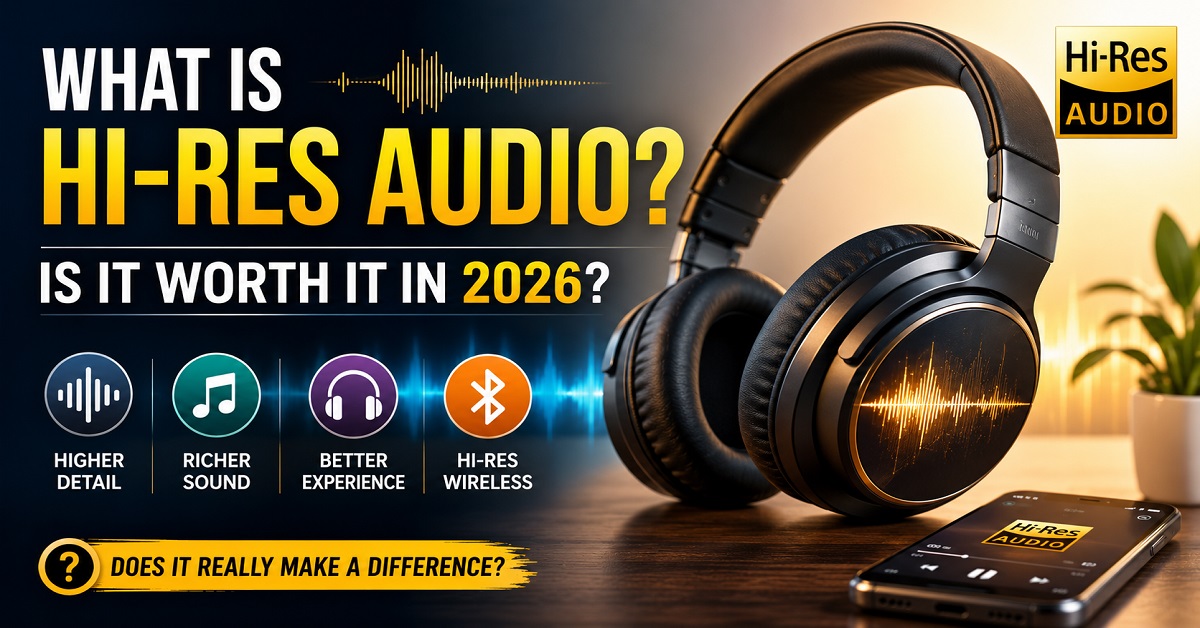
Hi-Res Audio (High-Resolution Audio) is an audio standard that captures and reproduces more sound detail than standard CD-quality audio. When paired with compatible headphones, earbuds, and music sources, it can deliver clearer vocals, better instrument separation, and a more natural listening experience. Whether it’s worth it depends on your equipment, the music source, and how carefully you listen.
Have you ever noticed a Hi-Res Audio logo on a pair of headphones or earbuds and wondered what it actually means?
You’re not alone.
Many popular earbuds and headphones now advertise Hi-Res Audio as a premium feature. Brands like Sony, Noise, OnePlus, realme, JBL, and others often highlight it on their product pages, making it seem like a must-have feature.
But here’s the question most buyers really want answered:
Does Hi-Res Audio actually make your music sound better, or is it mostly a marketing term?
The answer isn’t a simple yes or no.
For some people, Hi-Res Audio can noticeably improve the listening experience. For others, the difference may be difficult to hear, especially if they’re using compressed music files or basic streaming settings.
That’s why understanding what Hi-Res Audio really is before spending extra money is important.
In this guide, we’ll explain everything in simple language, including:
- What Hi-Res Audio means
- How it works
- How it’s different from standard audio
- Whether you need special headphones or earbuds
- Hi-Res Audio vs Lossless Audio
- Hi-Res Audio vs Dolby Atmos
- Whether it’s worth paying extra in 2026
By the end of this article, you’ll know whether Hi-Res Audio is something you actually need or simply a feature that’s nice to have.
Quick Answer
If you just want the short answer, here it is:
- Hi-Res Audio can provide better sound quality than standard audio by preserving more detail from the original recording.
- You’ll need compatible headphones or earbuds, a supported music source, and often a supported codec such as LDAC or LHDC to experience its full benefits wirelessly.
- Casual listeners may not notice a significant difference, but music enthusiasts and audiophiles often appreciate the added clarity and detail.
Now, let’s understand why.
What Is Hi-Res Audio?
Hi-Res Audio, short for High-Resolution Audio, is a certification given to audio devices and music files that can reproduce sound with more detail than standard CD-quality audio.
Think of it like watching a movie.
A standard video in 720p looks good, but when you watch the same movie in 4K, you can often see finer details, sharper textures, and more realistic colors.
Hi-Res Audio works in a similar way.
Instead of improving what you see, it improves what you hear.
It preserves more of the original recording, allowing subtle sounds, vocals, and instruments to come through with greater clarity.
This doesn’t mean every song will suddenly sound dramatically different. The improvement depends on several factors, including:
- The quality of the original recording
- Your music streaming service or audio file
- Your headphones or earbuds
- The device you’re listening on
When all these pieces work together, Hi-Res Audio can create a richer and more detailed listening experience.
What Does “Hi-Res Audio” Actually Mean?
To understand Hi-Res Audio, it’s helpful to know how digital music is stored.
When a song is recorded in a studio, it’s converted from an analog sound wave into digital data. During this process, the recording is measured thousands of times every second. These measurements are called samples.
Two important terms determine how much detail is preserved:
Sampling Rate
The sampling rate tells us how many times the sound is measured every second.
For example:
- 44.1 kHz means the sound is sampled 44,100 times per second.
- 96 kHz means it’s sampled 96,000 times per second.
A higher sampling rate allows more of the original sound information to be captured.
Bit Depth
Bit depth determines how much information is stored in each sample.
A higher bit depth provides a wider dynamic range, which means the recording can capture softer and louder sounds more accurately.
Here’s a simple comparison:
| Audio Format | Typical Sampling Rate | Typical Bit Depth |
|---|---|---|
| MP3 (compressed) | Varies | Lossy compression |
| CD Quality | 44.1 kHz | 16-bit |
| Hi-Res Audio | 96 kHz or higher | 24-bit or higher |
In simple terms:
- Higher sampling rate captures more detail over time.
- Higher bit depth captures more detail in loudness and subtle sound variations.
Together, they help preserve more of what the artist and sound engineer originally intended you to hear.
Think of it this way: Imagine taking a photo with an old 5 MP camera versus a modern 50 MP camera. Both capture the same scene, but the higher-resolution image retains more fine details when you zoom in. Hi-Res Audio follows a similar idea for sound. It doesn’t change the music itself, but it can preserve more of the original recording’s detail when the entire playback chain supports it.
How Does Hi-Res Audio Work?
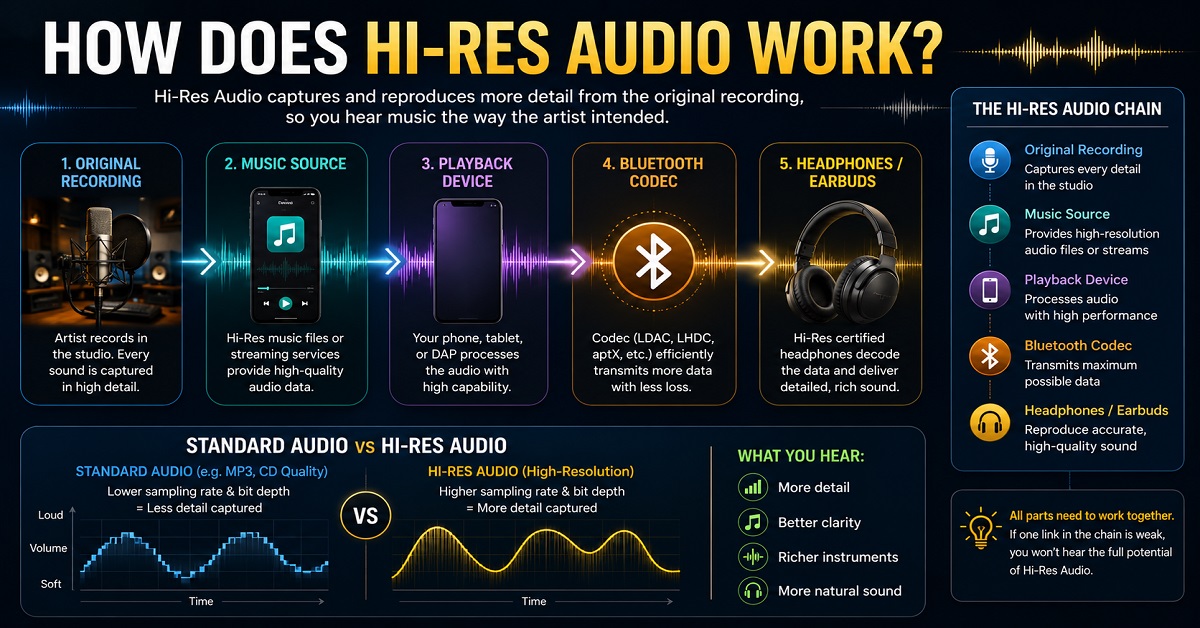
To understand how Hi-Res Audio works, imagine you’re attending a live concert.
You don’t just hear the singer’s voice. You also notice the guitar strings, the drummer’s cymbals, the audience cheering, and even the echoes inside the venue. All these tiny details come together to create a rich listening experience.
Now imagine someone records that concert.
If the recording captures only the most important sounds, you’ll still enjoy the music, but some of the finer details may be missing.
A Hi-Res Audio recording aims to preserve more of those subtle details so your headphones or earbuds can reproduce them more accurately.
However, there’s one important thing to remember:
Hi-Res Audio isn’t created by your headphones alone.
Think of it as a chain where every part needs to work together.
The chain looks like this:
Original Studio Recording → Music Source → Playback Device → Bluetooth Codec (if wireless) → Headphones or Earbuds
If one part of this chain doesn’t support Hi-Res Audio, the overall experience may be limited.
For example:
- A pair of Hi-Res Audio-certified earbuds won’t magically improve a low-quality MP3 file.
- Likewise, a Hi-Res music file won’t sound its best if you’re listening through basic earbuds that don’t support Hi-Res playback.
That’s why Hi-Res Audio is best experienced when all parts of the audio chain are compatible.
What Do You Need to Experience Hi-Res Audio?
Many people assume buying Hi-Res Audio earbuds is enough. In reality, you need a few things working together.
1. A High-Quality Music Source
The music itself should be available in high resolution.
Some streaming services and downloaded audio files support Hi-Res playback, while others may stream at lower quality by default.
If the original audio isn’t high quality, your headphones can’t create details that aren’t there.
2. Compatible Headphones or Earbuds
Look for devices that carry the Hi-Res Audio or Hi-Res Audio Wireless certification.
These products are designed to reproduce high-resolution audio within the required standards.
Examples include many premium headphones and earbuds from Sony, JBL, OnePlus, realme, and newer Noise models.
3. A Compatible Playback Device
Your smartphone, tablet, laptop, or music player should also support high-quality audio playback.
Modern Android smartphones generally provide better support for advanced Bluetooth codecs than many other devices, although compatibility varies by manufacturer.
Want to see some affordable earbuds that support advanced audio technologies? Check out our guide to the Best Open-Ear Earbuds Under ₹5000 in India (2026), where we’ve highlighted options like the Noise ALT Clip that offer Hi-Res Audio support.
4. The Right Bluetooth Codec
If you’re listening wirelessly, the Bluetooth codec becomes important.
We’ll explain codecs like LDAC and LHDC later in this article, but here’s the simple version:
A codec determines how audio travels from your phone to your earbuds.
Some codecs preserve more detail than others.
If you’re comparing wireless earbuds, understanding Bluetooth features is just as important as audio quality. You can also read our guide on What Is Bluetooth Multipoint Connectivity? to learn how modern earbuds stay connected to two devices at the same time.
How to Check if Your Phone Supports Hi-Res Audio
Buying Hi-Res Audio headphones or earbuds is only part of the equation. Your smartphone also needs to support the right audio technologies to get the best possible sound quality.
The good news is that checking whether your phone supports Hi-Res Audio is easier than you might think.
Let’s go through it step by step.
Method 1: Check the Phone’s Specifications
The easiest way to find out is by looking at your phone’s official specifications.
Visit the manufacturer’s website or product page and look for terms such as:
- Hi-Res Audio
- Hi-Res Audio Wireless
- LDAC
- LHDC
- aptX HD
- aptX Adaptive
- aptX Lossless
If you find any of these listed under the audio or connectivity section, your phone likely supports higher-quality audio playback.
For example, many smartphones from brands like Sony, OnePlus, Xiaomi, vivo, OPPO, realme, and Samsung support one or more advanced Bluetooth codecs, although support varies depending on the specific model.
Tip: Even phones from the same brand can have different audio capabilities. Always check the specifications for your exact model instead of assuming every phone supports Hi-Res Audio.
Method 2: Check Bluetooth Codec Support on Android
If you already own an Android phone, you can often see which Bluetooth codecs it supports.
Here’s how:
- Open Settings.
- Go to About Phone.
- Tap Build Number seven times to enable Developer Options (if not already enabled).
- Go back to Settings and open Developer Options.
- Scroll until you find Bluetooth Audio Codec.
If your phone supports advanced codecs, you may see options such as:
- SBC
- AAC
- aptX
- aptX HD
- LDAC
- LHDC (on supported devices)
Keep in mind that some codecs only appear when a compatible pair of headphones or earbuds is connected.
Note: Developer Options are intended for advanced users. If you’re unsure about any setting, avoid changing options other than viewing the available Bluetooth codecs.
Method 3: Check Your Earbuds or Headphones
Even if your phone supports Hi-Res Audio, your headphones or earbuds must also support the same technology.
For example:
- A phone that supports LDAC won’t use LDAC if your earbuds only support AAC.
- Likewise, LDAC-compatible earbuds will automatically switch to a lower codec if your phone doesn’t support LDAC.
In other words, both devices need to support the same codec for it to be used.
Method 4: Check Your Music Streaming Service
Another important factor is the music you’re listening to.
Many people buy Hi-Res Audio earbuds but continue streaming music at standard quality without realizing it.
Some music services offer higher-quality streaming, while others may use standard-quality streams by default.
If your music source doesn’t provide high-quality audio, even the best Hi-Res Audio headphones won’t be able to reproduce extra detail that isn’t there.
What About iPhones?
Apple devices don’t support Bluetooth codecs like LDAC or LHDC.
Instead, iPhones primarily use the AAC Bluetooth codec for wireless audio.
This still provides good sound quality for everyday listening, but it isn’t the same as wireless Hi-Res Audio through LDAC or LHDC.
If you want to enjoy Hi-Res Audio on an iPhone, you’ll typically need:
- A compatible wired headphone or earphone.
- An external DAC (Digital-to-Analog Converter), if required by your setup.
- A high-quality music source.
For most iPhone users listening wirelessly, AAC delivers a reliable and enjoyable experience, even though it doesn’t support the highest-resolution Bluetooth audio codecs.
How to Know if You’re Actually Listening in Hi-Res
Some music apps and devices display a small Hi-Res, Lossless, or LDAC icon while music is playing.
You may also find codec information in your phone’s Bluetooth settings or in the companion app provided by your headphone or earbud manufacturer.
Seeing one of these indicators is a good sign that your device is using a higher-quality audio mode, provided the rest of your setup also supports it.
Quick Checklist
Before investing in Hi-Res Audio headphones or earbuds, make sure you have:
✅ A phone that supports advanced audio playback or compatible Bluetooth codecs.
✅ Headphones or earbuds with Hi-Res Audio or Hi-Res Audio Wireless support.
✅ A music source that offers high-quality or Hi-Res audio.
✅ Matching Bluetooth codec support between your phone and your headphones or earbuds.
When all four work together, you’ll be in the best position to enjoy the extra detail and clarity that Hi-Res Audio is designed to deliver.
Hi-Res Audio vs Standard Audio
One of the easiest ways to understand Hi-Res Audio is by comparing it with standard audio.
| Feature | Standard Audio | Hi-Res Audio |
|---|---|---|
| Typical Quality | CD Quality or compressed | Higher than CD Quality |
| Sampling Rate | Usually 44.1 kHz | 96 kHz or higher |
| Bit Depth | 16-bit | 24-bit or higher |
| Sound Detail | Good | More detailed |
| Instrument Separation | Good | Better |
| Vocal Clarity | Good | More natural |
| File Size | Smaller | Larger |
The biggest difference isn’t that Hi-Res Audio makes music louder.
Instead, it aims to preserve more of the original recording, which can result in:
- Cleaner vocals
- Better instrument separation
- More natural sound
- Improved detail in complex songs
Will Everyone Hear the Difference?
Not necessarily.
The difference depends on several factors, including:
- Your hearing ability
- The headphones or earbuds you’re using
- The music you’re listening to
- The listening environment
For example:
If you’re listening on a crowded bus with traffic noise all around you, it’s unlikely you’ll notice every subtle detail that Hi-Res Audio can provide.
On the other hand, if you’re sitting in a quiet room wearing good-quality headphones and listening to a well-recorded song, you may notice clearer vocals and better instrument separation.
This is why opinions about Hi-Res Audio vary from person to person.
Hi-Res Audio vs MP3
Many people compare Hi-Res Audio with MP3 because MP3 has been one of the most common music formats for years.
The main difference lies in how the audio is stored.
MP3 uses lossy compression, which removes some audio information to reduce file size.
Hi-Res Audio aims to preserve much more of the original recording.
Here’s a simple comparison.
| Feature | MP3 | Hi-Res Audio |
|---|---|---|
| Compression | Yes (Lossy) | Usually Lossless or High Quality |
| File Size | Small | Larger |
| Sound Detail | Good for casual listening | More detailed |
| Storage Needed | Low | Higher |
| Best For | Everyday listening | Critical listening |
An easy way to think about it is this:
Imagine shrinking a high-resolution photo so it can be sent quickly over messaging apps.
The picture still looks fine, but some fine details disappear.
MP3 works similarly by reducing file size.
Hi-Res Audio keeps much more of the original information intact.
Hi-Res Audio vs Lossless Audio
This is one of the most confusing topics for buyers.
Many people think Hi-Res Audio and Lossless Audio are exactly the same.
They’re not.
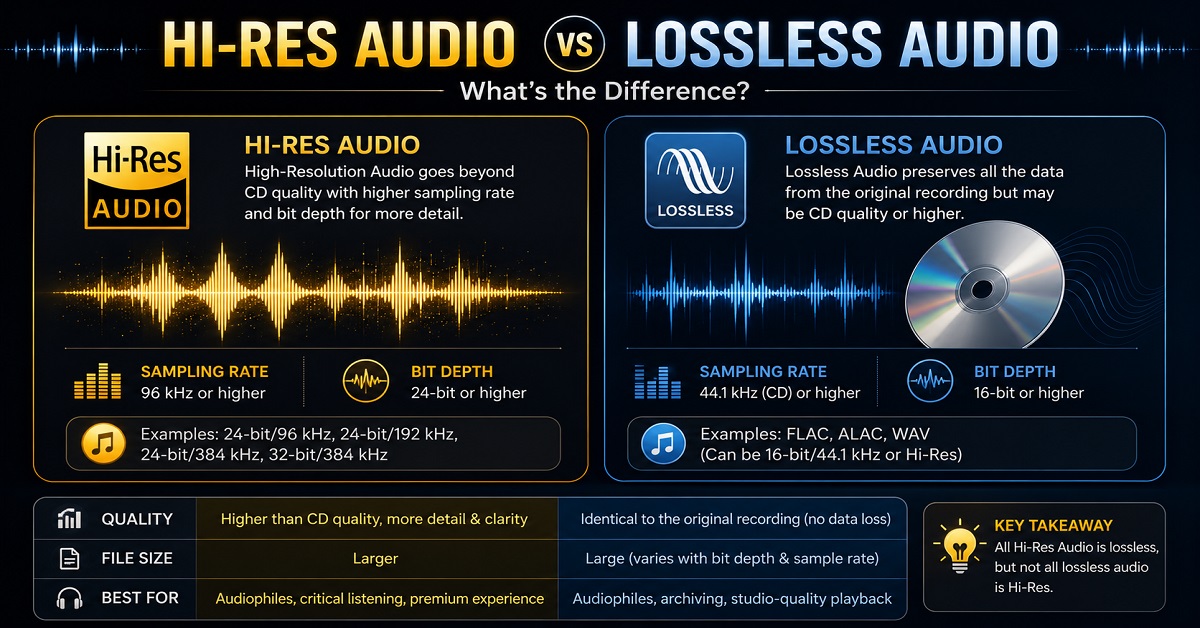
Lossless Audio means the music hasn’t lost information during compression.
Hi-Res Audio refers to audio that exceeds standard CD quality in resolution.
Think of it this way.
Every Hi-Res Audio file can be lossless, but not every lossless file is Hi-Res.
For example:
| Audio Type | Lossless | Hi-Res |
|---|---|---|
| MP3 | ❌ | ❌ |
| CD Quality FLAC (16-bit / 44.1 kHz) | ✅ | ❌ |
| 24-bit / 96 kHz FLAC | ✅ | ✅ |
So, while both aim to improve sound quality, they describe different things.
Is Hi-Res Audio Always Better?
Not always.
Hi-Res Audio offers the potential for better sound, but several factors influence what you actually hear.
For example:
A poorly recorded Hi-Res song may still sound worse than a professionally mastered standard-quality recording.
Similarly, wearing inexpensive earbuds won’t automatically let you hear all the extra detail in a Hi-Res file.
In other words:
Recording quality matters just as much as resolution.
Common Situations Where Hi-Res Audio Makes the Biggest Difference
You may appreciate Hi-Res Audio more if you:
- Listen in a quiet room.
- Enjoy acoustic music, jazz, classical music, or live recordings.
- Use premium headphones or earbuds.
- Listen for long periods.
- Prefer natural vocals over heavy bass.
If you mostly:
- Stream casual playlists while travelling,
- Watch YouTube videos,
- Listen in noisy environments,
the difference may be much less noticeable.
That’s perfectly normal.
Quick Summary
Here’s what we’ve learned so far:
✅ Hi-Res Audio captures more detail than standard CD-quality audio.
✅ You need compatible music, headphones, and a playback device to experience its full benefits.
✅ Hi-Res Audio doesn’t guarantee better sound on every song.
✅ Lossless Audio and Hi-Res Audio are related but not the same.
✅ The biggest improvements are often heard in quiet environments with good-quality equipment.
Hi-Res Audio vs Dolby Atmos: What’s the Difference?
Many people assume that Hi-Res Audio and Dolby Atmos are the same because both promise a better listening experience.
In reality, they improve your audio in completely different ways.
A simple way to understand it is this:
- Hi-Res Audio focuses on improving the quality and detail of the sound.
- Dolby Atmos focuses on improving the direction and placement of the sound.
Imagine you’re watching your favorite action movie.
With standard stereo audio, most sounds seem to come from the left and right sides.
With Dolby Atmos, it can feel as if a helicopter is flying above you or rain is falling around you. The audio becomes more immersive because sounds are positioned in a three-dimensional space.
Hi-Res Audio, on the other hand, doesn’t change where the sound comes from. Instead, it tries to preserve more of the original recording so instruments, vocals, and subtle details sound cleaner and more natural.
Quick Comparison
| Feature | Hi-Res Audio | Dolby Atmos |
|---|---|---|
| Main Purpose | Improves sound quality and detail | Creates immersive 3D sound |
| Best For | Music listening | Movies, TV shows, and supported music |
| Works With | Compatible audio files and devices | Dolby Atmos-supported content and devices |
| Changes Sound Position | No | Yes |
| Improves Audio Detail | Yes | Not necessarily |
Which One Is Better?
Neither is universally better because they serve different purposes.
If you mainly listen to music and care about hearing more detail in vocals and instruments, Hi-Res Audio is more relevant.
If you enjoy watching movies or playing games with surround sound effects, Dolby Atmos may have a bigger impact.
The good news is that many modern headphones and earbuds support both technologies, allowing you to enjoy the benefits of each depending on what you’re listening to.
What Is Hi-Res Audio Wireless?
Traditional Hi-Res Audio was originally designed for wired listening because wired connections can transmit large amounts of audio data without compression.
Wireless audio works differently.
Bluetooth has limited bandwidth, so audio often needs to be compressed before it’s sent from your phone to your headphones or earbuds.
To improve wireless sound quality, the Japan Audio Society (JAS) introduced the Hi-Res Audio Wireless certification.
Products with this certification meet specific performance requirements for high-quality wireless audio playback when used with supported codecs.
So, if you see a Hi-Res Audio Wireless logo on a pair of earbuds, it means they’re designed to deliver higher-quality wireless audio than standard Bluetooth earbuds, provided the rest of your setup also supports it.
What Are Bluetooth Codecs?
A Bluetooth codec is a technology that determines how audio is transmitted wirelessly from your phone, tablet, or laptop to your headphones or earbuds.
Think of a codec as a delivery service.
Imagine you’re sending a large package.
Some delivery services prioritize speed, while others focus on keeping the package in perfect condition.
Bluetooth codecs work in a similar way. Some prioritize compatibility and stability, while others are designed to preserve more audio detail.
That’s why two pairs of wireless earbuds can sound different even when playing the same song.
Common Bluetooth Codecs Explained
SBC
SBC (Subband Codec) is the standard Bluetooth codec supported by almost every Bluetooth audio device.
Best for:
- Everyday listening.
AAC
AAC is commonly used on Apple devices and is also supported by many Android phones.
Compared to SBC, AAC generally provides better sound quality at similar bitrates, especially within Apple’s ecosystem.
Best for:
- iPhone users.
- Apple Music listeners.
LDAC
Developed by Sony, LDAC is one of the most popular codecs for high-quality wireless audio.
It can transmit significantly more audio data than SBC, making it well suited for Hi-Res Audio playback on compatible Android devices.
Advantages
- Better audio quality.
- Supports Hi-Res Audio Wireless.
- Widely available on many Android phones.
Things to Remember
Both your phone and your headphones or earbuds must support LDAC. If either device doesn’t support it, the connection will automatically fall back to another codec.
LHDC
LHDC (Low Latency and High-Definition Audio Codec) is another high-quality Bluetooth codec found on select smartphones and earbuds.
Like LDAC, it’s designed to preserve more audio detail during wireless playback.
It’s less common than LDAC but is becoming more popular on newer devices, especially in Asia.
aptX Lossless
Developed by Qualcomm, aptX Lossless is designed to deliver CD-quality audio wirelessly under ideal conditions.
Support is still limited because both the source device and the headphones or earbuds must use compatible Qualcomm hardware.
As more devices adopt this technology, it’s likely to become more common in the coming years.
Bluetooth Codec Comparison
| Codec | Sound Quality | Device Support | Suitable for Hi-Res Audio |
|---|---|---|---|
| SBC | Good | Almost all devices | No |
| AAC | Very Good | Apple and many Android devices | Limited |
| LDAC | Excellent | Many Android devices | Yes |
| LHDC | Excellent | Selected devices | Yes |
| aptX Lossless | Excellent | Limited compatible devices | Yes (CD-quality under supported conditions) |
Do You Need LDAC or LHDC?
Not necessarily.
If you mainly use streaming services with standard-quality settings, you may not notice a huge difference.
However, if you:
- Listen to high-quality music files,
- Use a compatible Android smartphone,
- Own Hi-Res Audio-certified headphones or earbuds,
then LDAC or LHDC can help you get closer to the full potential of your equipment.
Can You Actually Hear the Difference?
This is probably the most common question people ask.
The honest answer is:
It depends.
Some listeners notice the improvement immediately, while others hear very little difference.
Several factors influence what you hear, including:
- Your hearing ability.
- The quality of the recording.
- The headphones or earbuds you’re using.
- The music source.
- Your listening environment.
For example, imagine listening to an acoustic song by your favorite artist.
With a good pair of Hi-Res Audio headphones, you may notice:
- Clearer vocals.
- More separation between instruments.
- A wider sense of space.
- Better detail during quiet passages.
Now imagine listening to the same song while walking beside a busy road.
Traffic noise, wind, and other distractions will mask many of those subtle improvements.
That’s why some people swear by Hi-Res Audio while others don’t hear much of a difference.
Both experiences are valid because listening conditions play a huge role.
Who Is Most Likely to Benefit from Hi-Res Audio?
Hi-Res Audio may be worth exploring if you:
- Enjoy listening to music in a quiet environment.
- Prefer detailed vocals and instrument separation.
- Own good-quality headphones or earbuds.
- Subscribe to streaming services that offer high-quality audio.
- Listen to genres such as classical, jazz, acoustic, instrumental, or live recordings.
If your listening habits mostly involve podcasts, YouTube videos, or heavily compressed music while commuting, Hi-Res Audio is less likely to make a dramatic difference.
That doesn’t mean it’s useless. It simply means the improvement may not justify paying significantly more for your particular use case.
Is Hi-Res Audio Worth It?
After reading this far, you might still be wondering:
“Should I pay extra for Hi-Res Audio?”
The answer depends on how you listen to music and what you expect from your headphones or earbuds.
For some people, Hi-Res Audio is a feature they’ll genuinely appreciate. For others, it may not make a noticeable difference.
Let’s look at different types of users.
1. Casual Listeners
If you mainly:
- Listen to Spotify or YouTube on default settings.
- Watch movies occasionally.
- Use your earbuds while travelling or commuting.
- Listen in noisy places.
Then Hi-Res Audio shouldn’t be your top priority.
Instead, focus on:
- Comfort
- Battery life
- Good call quality
- Stable Bluetooth connectivity
- Reliable build quality
You’ll probably get more value from these features than from Hi-Res Audio alone.
2. Music Enthusiasts
If you enjoy sitting down and listening to music without distractions, Hi-Res Audio can be worthwhile.
You may notice:
- Cleaner vocals.
- Better instrument separation.
- More natural sound.
- Greater detail in acoustic recordings.
The experience becomes even better when paired with high-quality music files or supported streaming services.
3. Movie Lovers
If you mostly watch movies or TV shows, Hi-Res Audio is helpful but isn’t the most important feature.
In many cases, technologies like Dolby Atmos or Spatial Audio have a greater impact because they create a more immersive surround sound experience.
4. Gamers
Gamers usually benefit more from:
- Low latency.
- Accurate directional audio.
- Stable wireless connectivity.
Hi-Res Audio is a nice bonus, but it isn’t usually the deciding factor when choosing gaming earbuds or headphones.
5. Office Users
If you use earbuds for:
- Online meetings.
- Voice calls.
- Podcasts.
- Background music while working.
Then clear microphones, comfort, and long battery life are generally more important than Hi-Res Audio.
Common Myths About Hi-Res Audio
Let’s clear up some common misconceptions.
Myth 1: Hi-Res Audio Always Sounds Better
Reality:
Not necessarily.
A poorly recorded Hi-Res track can still sound worse than a well-mastered standard-quality recording.
The quality of the original recording matters just as much.
Myth 2: Bigger Drivers Automatically Mean Hi-Res Audio
Reality:
Driver size alone doesn’t determine sound quality.
A well-designed 10mm driver can outperform a poorly tuned 14mm driver.
Sound tuning, driver quality, and overall engineering all play important roles.
If you’d like to understand this in more detail, read our guide on What Are Headphone Drivers? Types, Sizes, and Do They Really Matter?
Myth 3: Every Bluetooth Earbud Supports Hi-Res Audio
Reality:
No.
Many Bluetooth earbuds only support basic codecs such as SBC or AAC.
To enjoy wireless Hi-Res Audio, both your source device and your earbuds should support advanced codecs like LDAC or LHDC.
Myth 4: Hi-Res Audio Means Deep Bass
Reality:
Hi-Res Audio isn’t designed to increase bass.
Instead, it focuses on preserving more detail and accuracy across the entire frequency range.
Some Hi-Res headphones actually sound more balanced than bass-heavy consumer earbuds.
Myth 5: You Need Expensive Equipment
Reality:
Not always.
Many affordable earbuds and headphones now support Hi-Res Audio.
However, the overall listening experience still depends on the music source, playback device, and Bluetooth codec.
Our Recommendation
If you’re buying new headphones or earbuds, don’t choose a product only because it says “Hi-Res Audio” on the box.
Instead, consider the complete package.
Ask yourself:
- Is it comfortable?
- Does it have good battery life?
- Are the microphones clear for calls?
- Does it support the Bluetooth features I need?
- Is it within my budget?
- Does it have reliable customer reviews?
If two products are otherwise similar, choosing the one with Hi-Res Audio support can be a smart bonus.
But it shouldn’t be the only reason you buy it.
Frequently Asked Questions
What is Hi-Res Audio?
Hi-Res Audio (High-Resolution Audio) is a standard for audio that captures and reproduces more detail than standard CD-quality audio. When combined with compatible devices and music sources, it can provide a more detailed and natural listening experience.
Is Hi-Res Audio better than MP3?
Yes, in terms of audio quality.
MP3 uses lossy compression that removes some audio information to reduce file size, while Hi-Res Audio preserves much more of the original recording.
Is Hi-Res Audio the same as Lossless Audio?
No.
Lossless Audio means no audio information is lost during compression, while Hi-Res Audio refers to audio that exceeds standard CD-quality resolution.
Some Hi-Res Audio files are also lossless, but not every lossless file qualifies as Hi-Res Audio.
Does Spotify support Hi-Res Audio?
Spotify currently streams music in high quality, but it does not offer a Hi-Res Audio streaming tier.
If you’re specifically looking for Hi-Res streaming, you’ll need to use a service that supports high-resolution playback.
Can I use Hi-Res Audio with Bluetooth earbuds?
Yes, but only if both your phone and your earbuds support compatible high-quality Bluetooth codecs such as LDAC or LHDC.
Otherwise, Bluetooth will use another supported codec automatically.
Is Hi-Res Audio worth paying extra for?
If you enjoy high-quality music, own good headphones or earbuds, and often listen in quiet environments, Hi-Res Audio can be worth paying extra for.
For casual listeners, features like comfort, battery life, and call quality may provide greater day-to-day value.
Do I need special headphones for Hi-Res Audio?
Yes.
To fully experience Hi-Res Audio, you’ll need headphones or earbuds designed to reproduce high-resolution audio. Pairing them with compatible devices and high-quality music sources helps you get the best results.
Can everyone hear the difference?
Not always.
The difference depends on your hearing, your equipment, the music you’re listening to, and your environment. Some people notice clearer details immediately, while others may hear only a small improvement.
Final Verdict
So, does Hi-Res Audio really matter?
The answer is yes, but only when the rest of your audio setup can take advantage of it.
Hi-Res Audio isn’t a magical feature that instantly transforms every pair of headphones or earbuds. Instead, it’s one piece of a larger puzzle that includes the quality of the recording, the music source, your playback device, and the headphones or earbuds you’re using.
If you already enjoy listening to high-quality music and value detailed, natural sound, Hi-Res Audio is certainly worth considering.
However, if your primary focus is phone calls, battery life, comfort, or workouts, those features will often have a greater impact on your everyday experience.
The best approach is to look beyond marketing labels and choose a product that offers the right combination of sound quality, comfort, features, and reliability for your needs.
At AudioPick, that’s exactly how we evaluate every headphone and earbud we recommend.
Related Articles You May Like
If you found this guide helpful, you might also enjoy these articles:
- What Is Spatial Audio in Headphones and Earbuds? Does It Really Matter?
- What Are Headphone Drivers? Types, Sizes, and Do They Really Matter?
- What Is ANC in Headphones and How Does It Work?
- Best Open-Ear Earbuds Under ₹5000 in India (2026)
- Best Wireless Headphones Under ₹10000 in India (2026)

About the Author
Hari Prasad is the editor of AudioPick.in and a lifelong audio enthusiast. He writes detailed, honest reviews and guides to help everyday users pick the right gear without tech jargon. His personal interest in Bluetooth audio, neckbands, and codecs comes from testing dozens of devices over the past few years.