
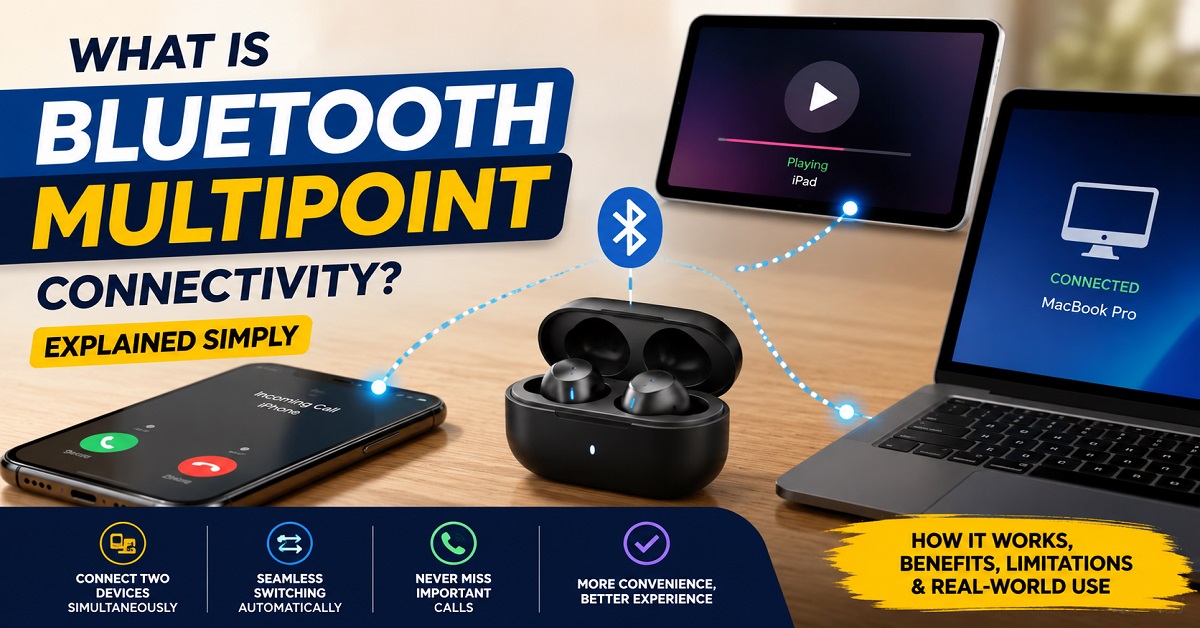
Have you ever been listening to music on your laptop and then missed an important phone call because your earbuds were connected to the wrong device? Or perhaps you’ve had to manually disconnect your headphones from one device before connecting them to another. If so, you’re not alone.
Many people use multiple devices throughout the day. A smartphone for calls, a laptop for work meetings, a tablet for streaming videos, or even a second phone for business purposes. Managing Bluetooth connections between all these devices can quickly become frustrating, especially when you’re switching back and forth several times a day.
This is where Bluetooth Multipoint Connectivity comes in.
By the end of this guide, you’ll understand exactly what Bluetooth Multipoint Connectivity is, how it works behind the scenes, when it is useful, and whether it’s a feature you should look for when buying earbuds or headphones. You’ll also learn its limitations, common misconceptions, and practical ways it can improve your daily listening experience.
Whether you’re shopping for new audio gear or simply curious about a feature you’ve seen in product specifications, this guide will help you make more informed decisions.
What Does Bluetooth Multipoint Connectivity Mean?
Bluetooth Multipoint Connectivity is a feature that allows a pair of earbuds or headphones to stay connected to more than one device at the same time.
Without multipoint, your headphones typically maintain an active connection with only one device. If you want to switch from your laptop to your phone, you often need to disconnect from one device and reconnect to the other manually.
With Bluetooth Multipoint Connectivity, your audio device can maintain simultaneous connections to two or sometimes more devices.
For example:
- Your earbuds stay connected to your laptop
- Your earbuds also stay connected to your smartphone
- You listen to music on your laptop
- A phone call arrives on your smartphone
- The earbuds automatically switch to the call
- After the call ends, audio returns to the laptop
The process happens automatically without requiring you to reconnect anything.
Think of it like having one set of earbuds with two open doors instead of one. Your earbuds can listen for audio from multiple devices and switch when needed.
Latest Post: Why Do Earbuds Sound Better at Night? The Real Science Explained
Why This Matters When Buying Audio Products
Bluetooth Multipoint Connectivity has become increasingly important because people rarely use only one device anymore.
A typical day might involve:
- Checking emails on a laptop
- Taking calls on a smartphone
- Watching videos on a tablet
- Attending online meetings
- Listening to music between tasks
Without multipoint support, switching between devices becomes a repetitive process.
You may need to:
- Open Bluetooth settings
- Disconnect the current device
- Pair with another device
- Wait for reconnection
Repeating this several times daily can become annoying.
When comparing earbuds or headphones, Bluetooth Multipoint Connectivity can significantly affect convenience, especially if:
- You work remotely
- You attend virtual meetings
- You carry both personal and work phones
- You regularly switch between computers and phones
In many cases, the feature doesn’t improve sound quality, battery life, or microphone performance. Instead, it improves your overall user experience by reducing friction during daily use.
How It Works (Explained Simply)
To understand Bluetooth Multipoint Connectivity, let’s first look at standard Bluetooth connections.
Traditional Bluetooth Connection
Imagine your earbuds are having a conversation.
Normally, they talk to one device at a time.
For example:
- Earbuds connected to Phone A
- Laptop B cannot communicate with the earbuds until Phone A disconnects
This creates a one-to-one relationship.
Bluetooth Multipoint Connection
With multipoint support:
- Earbuds connect to Phone A
- Earbuds also connect to Laptop B
- Both connections remain active
The earbuds constantly monitor both devices.
When audio starts on one device, the earbuds determine which audio should take priority.
For example:
Scenario 1
You’re watching a YouTube video on your laptop.
Suddenly, your smartphone receives a call.
The earbuds detect the incoming call and automatically switch to the phone.
Once the call ends, the earbuds return to the laptop audio.
Scenario 2
You’re listening to music on your phone.
A work meeting begins on your laptop.
The laptop audio becomes active and the earbuds switch accordingly.
The exact behavior depends on how the manufacturer has implemented multipoint technology.
Different Types of Bluetooth Multipoint
Many people assume all multipoint systems work the same way, but they do not.
Simple Multipoint
Supports two connected devices.
This is the most common implementation found in modern earbuds and headphones.
Advanced Multipoint
Allows more intelligent switching between devices.
The headphones may prioritize calls, meetings, notifications, or media playback differently.
Multi-Device Pairing
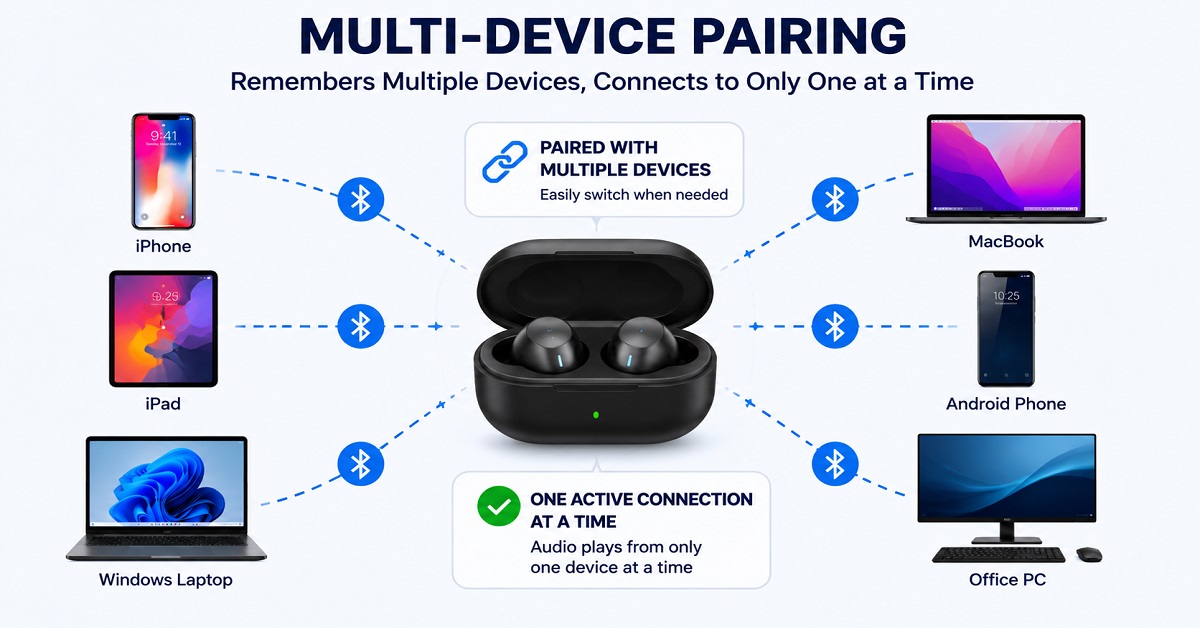
This is often confused with multipoint.
Some headphones can remember many paired devices but connect to only one at a time.
For example:
- Remembers 8 devices
- Connects to only 1 active device
This is not true Bluetooth Multipoint Connectivity.
Common Misunderstandings and Myths
Myth 1: Multipoint Means Unlimited Connections
Not true.
Most audio products support only two simultaneous active connections.
Some support more, but two remains the most common setup.
Myth 2: Multipoint Improves Sound Quality
Multipoint affects convenience, not audio quality.
Sound quality depends on:
- Drivers
- Audio tuning
- Codec support
- Hardware design
Multipoint simply changes how devices connect.
Myth 3: Every Bluetooth 5.3 Device Has Multipoint
Bluetooth version and multipoint support are separate things.
A product may use Bluetooth 5.3 and still lack Bluetooth Multipoint Connectivity.
Always check product specifications.
Myth 4: Multipoint Works Perfectly on Every Device
Compatibility varies.
Different operating systems and manufacturers may handle device switching differently.
The experience can vary between:
- Windows
- macOS
- Android
- iPhone
- Tablets
Recommended for you: Why Earbuds Sound Different Even with Similar Specs
Real-World Scenarios and Examples
Working From Home
Imagine you’re attending a Zoom meeting on your laptop.
At the same time, your phone receives an important call from a client or family member.
Without multipoint:
- Disconnect laptop
- Connect phone
- Answer call
With Bluetooth Multipoint Connectivity:
- Call automatically takes priority
- Earbuds switch instantly
- Return to laptop afterward
This saves time and reduces interruptions.
Office Workers
Many professionals carry:
- Work phone
- Personal phone
Multipoint allows both devices to remain connected simultaneously.
You don’t have to decide which phone gets priority before starting your day.
Traveling
While waiting at an airport, you may:
- Watch a movie on a tablet
- Receive a call on your phone
Multipoint allows seamless transitions between entertainment and communication.
Music Listening
Suppose you’re listening to Spotify on your laptop.
Your phone rings.
Instead of scrambling to change connections, your earbuds automatically handle the transition.
The experience feels more natural and less distracting.
Online Classes and Students
Students frequently switch between:
- Lecture videos
- Calls
- Messaging apps
- Tablets
Bluetooth Multipoint Connectivity can make studying smoother by reducing connection management.
Pros, Cons, and Limitations
Advantages
More Convenience
The biggest benefit is convenience.
You spend less time managing Bluetooth settings.
Better Productivity
Quick switching helps maintain workflow.
This is particularly useful for remote workers.
Improved Call Handling
Important calls can be answered immediately.
Supports Modern Device Usage
Most people use multiple devices daily.
Multipoint aligns with modern habits.
Limitations
Possible Battery Impact
Maintaining multiple connections may increase power consumption slightly.
The impact is usually small but can vary.
Compatibility Differences
Not all devices behave the same way.
Some combinations work better than others.
Audio Priority Conflicts
Occasionally, devices may compete for audio control.
For example:
- A notification interrupts playback
- Unexpected switching occurs
Not Always Necessary
Some users rarely switch devices.
In those situations, multipoint offers little value.
Bluetooth Multipoint vs Device Switching
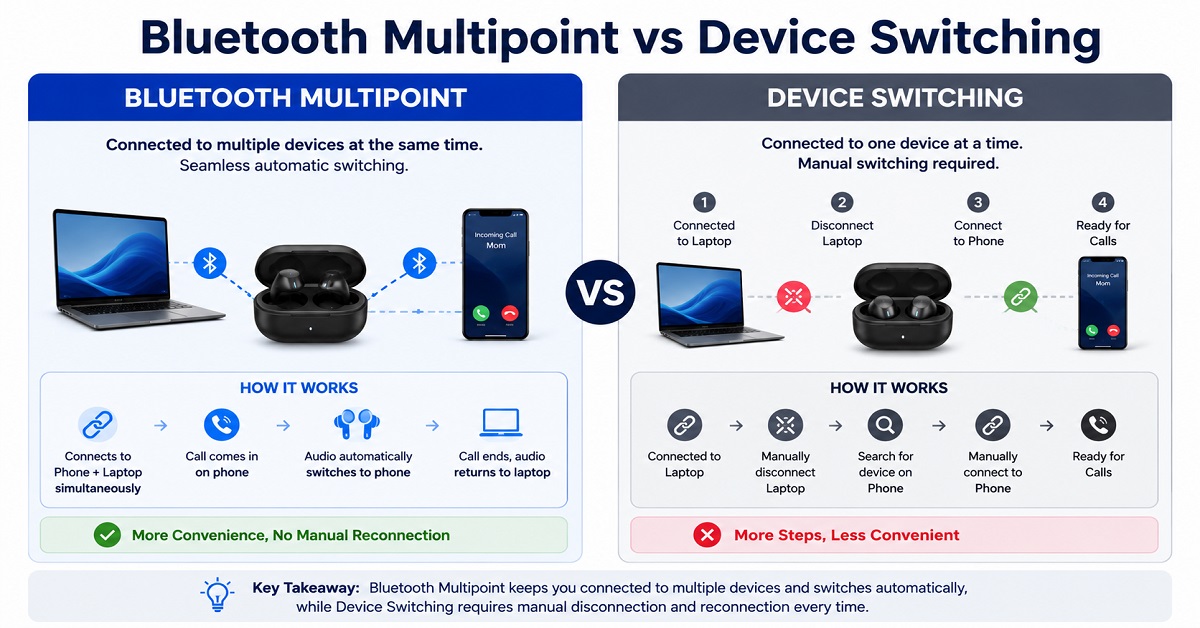
These terms are often confused.
Device Switching
- One active connection
- Manual switching required
- Disconnect and reconnect process
Bluetooth Multipoint Connectivity
- Multiple active connections
- Automatic switching
- Reduced user intervention
If convenience is important, true multipoint support is usually the better option.
How to Make Better Decisions Using This Knowledge
When reading reviews or comparing products, don’t simply look for the words “multipoint supported.”
Consider your own habits.
Ask yourself:
How Many Devices Do I Use Daily?
If the answer is one, multipoint may not matter.
If the answer is two or more, it becomes more valuable.
Do I Work on a Computer?
Frequent laptop users benefit greatly from Bluetooth Multipoint Connectivity.
Do I Take Calls Often?
Multipoint makes handling calls significantly easier.
Do I Switch Between Devices Frequently?
The more often you switch, the more valuable the feature becomes.
When reading product reviews, look beyond the specification sheet and check how well the feature performs in real-world use.
This knowledge can help you compare earbuds and headphones more effectively and avoid paying for features you may never use.
When You Should Care About This (and When You Don’t)
You Should Care If
- You use a laptop and phone daily
- You work remotely
- You attend online meetings
- You own multiple devices
- You take frequent calls
- You value convenience
You May Not Need It If
- You use only one device
- You rarely switch between devices
- You mainly listen to offline music
- You prioritize sound quality above convenience
In these situations, other features may deserve more attention.
Troubleshooting Common Multipoint Issues
Even good implementations occasionally experience problems.
Device Doesn’t Switch Automatically
Try:
- Updating firmware
- Reconnecting both devices
- Restarting Bluetooth
Audio Comes From the Wrong Device
Pause playback on the unwanted device and restart audio on the desired device.
Frequent Disconnections
Check:
- Battery levels
- Software updates
- Bluetooth interference from nearby electronics
Multipoint Isn’t Working
Verify that:
- The feature is enabled
- Both devices support the required Bluetooth profiles
- Your headphones officially support Bluetooth Multipoint Connectivity
Beginner vs Advanced Understanding
Beginner Explanation
Your earbuds stay connected to two devices and automatically switch when needed.
That’s all most users need to know.
Advanced Explanation
The earbuds maintain simultaneous Bluetooth links while managing audio priorities between connected devices. The firmware determines which audio source receives priority and how transitions occur between devices.
For everyday use, the simpler explanation is usually enough.
Explore Next: Open-Ear Earbuds Explained: Are They Better Than Normal Earbuds?
Frequently Asked Questions
Does Bluetooth Multipoint Connectivity work with iPhones?
Yes. Many modern headphones and earbuds support multipoint connections with iPhones, though performance can vary depending on the product.
Can Bluetooth Multipoint Connectivity connect to three devices?
Most products support two simultaneous connections. Some advanced models support additional connections, but this is less common.
Does multipoint reduce sound quality?
No. Multipoint mainly affects connectivity and convenience rather than audio quality.
Is Bluetooth Multipoint Connectivity useful for work?
Yes. It is especially useful for people who switch between phones and computers throughout the day.
Does multipoint drain battery faster?
There can be a small increase in power consumption because the device maintains multiple active connections, but the difference is usually modest.
Can I use multipoint with a laptop and phone?
Yes. This is one of the most common use cases and often the main reason people seek out the feature.
Is multipoint the same as Bluetooth pairing?
No. Pairing means a device remembers another device. Multipoint means maintaining active connections to multiple devices simultaneously.
Many people struggle with Bluetooth connection issues without realizing a solution already exists. Sharing this guide can help friends, family members, coworkers, and students understand why switching between devices sometimes feels frustrating and how Bluetooth Multipoint Connectivity solves that problem.
The more people understand audio features before buying, the easier it becomes to choose products that genuinely fit their daily needs. A few minutes of learning can prevent months of inconvenience and confusion.
Conclusion
Bluetooth Multipoint Connectivity is not a feature that changes sound quality, but it can dramatically improve everyday convenience. Instead of manually disconnecting and reconnecting devices, it allows your earbuds or headphones to maintain active connections with multiple devices and switch between them when needed.
You learned what the feature means, how it works, where it is useful, its limitations, and the situations where it matters most. You also learned how to distinguish true multipoint support from simple device memory and why this knowledge is valuable when comparing audio products.
Understanding features like Bluetooth Multipoint Connectivity helps you look beyond marketing terms and focus on how a product will actually fit into your daily routine. The better you understand these details, the easier it becomes to make confident and informed buying decisions.

About the Author
Hari Prasad is the editor of AudioPick.in and a lifelong audio enthusiast. He writes detailed, honest reviews and guides to help everyday users pick the right gear without tech jargon. His personal interest in Bluetooth audio, neckbands, and codecs comes from testing dozens of devices over the past few years.