Quick Answer
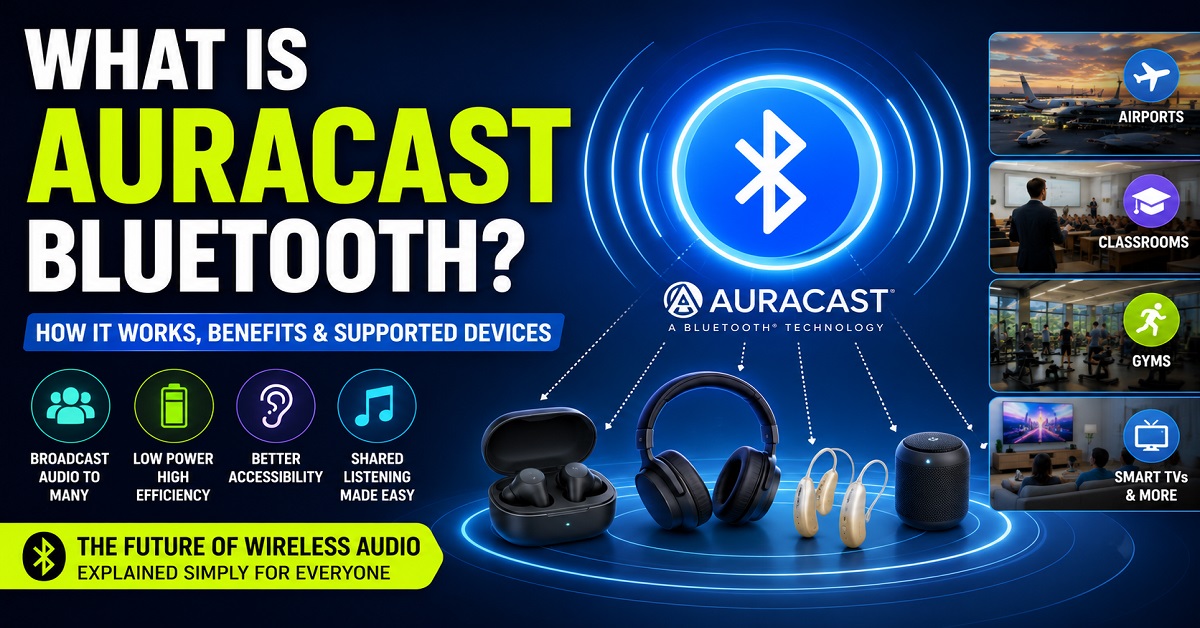
Auracast Bluetooth is a new wireless audio broadcasting technology built on Bluetooth LE Audio. Unlike traditional Bluetooth, which usually connects one audio source to one or two devices, Auracast allows a single source to broadcast audio to multiple compatible earbuds, headphones, hearing aids, and speakers simultaneously. This makes it ideal for places like airports, gyms, museums, classrooms, and even home entertainment systems.
How We Researched This Article
At Audiopick, our goal is to explain audio technologies in simple, practical language. For this article, we reviewed Bluetooth technology standards, official manufacturer information, industry announcements, and real-world use cases to understand how Auracast works and where it can benefit everyday users.
Rather than focusing only on technical specifications, we explain how Auracast Bluetooth can improve your listening experience in daily life and whether it’s a feature worth considering when buying your next pair of earbuds or headphones.
Have you ever wished you could connect multiple wireless earbuds to the same TV, listen to airport announcements directly through your earbuds, or share music with friends without passing around one earbud?
Traditional Bluetooth has made wireless audio incredibly convenient, but it still has limitations. In most cases, you can only connect one or two audio devices to a single source at a time. That means sharing audio or listening to public broadcasts isn’t always simple.
That’s exactly the problem Auracast Bluetooth aims to solve.
Built on the latest Bluetooth LE Audio technology, Auracast introduces a new way to listen. Instead of creating a private connection between two devices, it allows compatible audio sources to broadcast sound to multiple nearby listeners simultaneously. Whether you’re travelling through an airport, watching a muted TV in a gym, attending a lecture, or sharing music with family, Auracast makes wireless audio more flexible than ever before.
But how does it actually work? Do you need special earbuds? Is it better than regular Bluetooth? And is it worth looking for this feature when buying new headphones or earbuds?
In this guide, we’ll explain what Auracast Bluetooth is, how it works, its advantages and limitations, the devices that support it, and whether it’s a feature you should care about in 2026.
What Is Auracast Bluetooth?
Auracast Bluetooth is a new wireless audio broadcasting technology that allows a single audio source to stream sound to multiple compatible devices at the same time. Instead of creating a private one-to-one Bluetooth connection, Auracast works like a public radio station, broadcasting audio that nearby users can join if they have compatible earbuds, headphones, hearing aids, or speakers.
For example, imagine you’re waiting at an airport. Instead of trying to hear announcements over loud background noise, you could connect your Auracast-compatible earbuds directly to the airport’s audio broadcast and listen clearly.
The same technology can also be used in gyms, museums, universities, conference halls, sports stadiums, cinemas, and even at home.
In simple terms:
- Traditional Bluetooth creates a private connection between one source and one or two devices.
- Auracast Bluetooth creates a public or shared audio broadcast that many compatible devices can join simultaneously.
This makes Auracast one of the biggest improvements to Bluetooth audio in recent years.
What Is Bluetooth LE Audio?
To understand Auracast, it’s important to first understand Bluetooth LE Audio.
Bluetooth LE Audio (Low Energy Audio) is the next generation of Bluetooth audio technology. It was designed to improve audio quality while using less battery power than traditional Bluetooth audio.
Auracast is one of the most exciting features introduced with Bluetooth LE Audio.
Besides Auracast, Bluetooth LE Audio also brings several other improvements, including:
- Better audio quality at lower bitrates
- Lower power consumption for longer battery life
- Reduced audio latency for videos and gaming
- Improved support for hearing aids
- More reliable wireless connections
Because Auracast relies on Bluetooth LE Audio, devices must support LE Audio before they can support Auracast.
Think of it this way:
- Bluetooth LE Audio is the new technology platform.
- Auracast is one of the powerful features built on that platform.
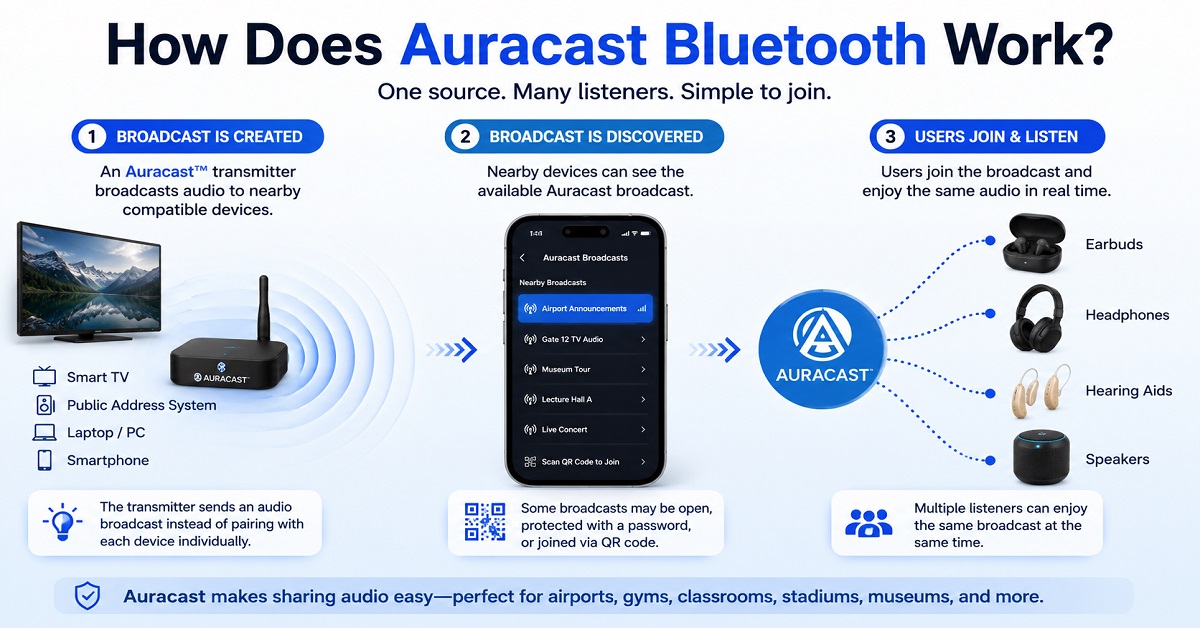
How Does Auracast Bluetooth Work?
Auracast works differently from the Bluetooth connections most people use today.
With traditional Bluetooth, your smartphone searches for a nearby device, pairs with it, and creates a private connection.
Auracast removes the need for this one-to-one pairing.
Instead, a compatible device broadcasts an audio stream that nearby users can discover and join.
The process is surprisingly simple:
Step 1: An audio source creates a broadcast.
This could be:
- A smart TV
- A smartphone
- A laptop
- An airport announcement system
- A gym television
- A conference audio system
Step 2: The broadcast becomes available.
Nearby users can see the available Auracast broadcast on their compatible devices.
Some broadcasts may be:
- Open for anyone
- Protected with a password
- Joined by scanning a QR code
Step 3: Users connect.
Instead of pairing directly with another device, users simply join the broadcast using compatible earbuds or headphones.
Within seconds, everyone hears the same audio stream.
No complicated pairing process.
No sharing one earbud.
No passing your phone around.
A Simple Real-Life Example
Imagine you’re watching a cricket match at a sports bar.
The television is muted because music is playing throughout the venue.
With Auracast Bluetooth, the TV can broadcast its audio wirelessly.
You simply:
- Open the Auracast menu on your compatible earbuds.
- Select the TV broadcast.
- Instantly hear live commentary directly through your earbuds.
Meanwhile, dozens of other people can join the exact same broadcast using their own compatible devices.
Everyone enjoys the same audio without interfering with anyone else’s connection.
Another Everyday Example
Suppose your family wants to watch a late-night movie.
Instead of increasing the TV volume and disturbing others, the television can broadcast audio using Auracast.
Each family member connects their own compatible earbuds.
Everyone listens comfortably at their preferred volume while the room stays quiet.
This creates a much more flexible and personalised listening experience than traditional Bluetooth connections.
Why Is Auracast Bluetooth Such a Big Upgrade?
Auracast changes the way we think about wireless audio.
Instead of connecting one device to another, it allows one source to reach many listeners simultaneously.
This opens the door to entirely new experiences that weren’t practical with older Bluetooth technology.
Some of the biggest improvements include:
- Easier audio sharing with friends and family
- Better accessibility for people with hearing loss
- Clearer public announcements in noisy places
- Personal listening in gyms, airports, and waiting rooms
- Future-ready wireless audio for smart homes and entertainment systems
As more smartphones, TVs, earbuds, headphones, and hearing aids begin supporting Bluetooth LE Audio, Auracast is expected to become increasingly common over the next few years.
Key Takeaways
Before moving on, here’s a quick recap:
✅ Auracast is built on Bluetooth LE Audio.
✅ It allows one device to broadcast audio to multiple compatible listeners.
✅ It removes the limitations of traditional one-to-one Bluetooth pairing.
✅ It can be used in public venues, workplaces, classrooms, homes, and entertainment systems.
✅ Support is growing as more manufacturers introduce Auracast-compatible devices.
Key Features of Auracast Bluetooth
Auracast Bluetooth isn’t just another update to wireless audio. It introduces several new features that make listening more convenient, accessible, and flexible than traditional Bluetooth.
Here are some of its standout features.
1. Broadcast Audio
The biggest feature of Auracast is broadcast audio.
Instead of creating a private connection between two devices, one compatible device can broadcast audio to multiple nearby listeners simultaneously.
For example, a smart TV in a waiting room can broadcast its audio to dozens of compatible earbuds or headphones at the same time.
2. Multiple Listeners at Once
Traditional Bluetooth usually supports one or two connected audio devices.
Auracast removes this limitation.
Hundreds of compatible devices can join the same broadcast without affecting each other’s listening experience.
This makes it ideal for:
- Airports
- Universities
- Conference halls
- Museums
- Sports stadiums
- Public events
3. Easy Audio Sharing
Sharing music with friends becomes much easier.
Instead of giving someone one of your earbuds or using complicated pairing methods, everyone can simply join the same Auracast broadcast using their own compatible earbuds.
Each listener can also adjust their own volume independently.
4. Better Accessibility
Auracast has the potential to significantly improve accessibility for people with hearing loss.
Compatible hearing aids can receive broadcasts directly from supported televisions, public announcement systems, lecture halls, and other audio sources.
This helps users hear speech more clearly without increasing background noise.
5. Lower Power Consumption
Since Auracast is built on Bluetooth LE Audio, it is designed to use less power than older Bluetooth audio technologies.
This can help compatible devices achieve better battery efficiency while maintaining high-quality audio.
Actual battery life will still depend on the device, usage, and manufacturer implementation.
6. Improved Audio Quality
Bluetooth LE Audio introduces the LC3 audio codec, which is more efficient than the classic SBC codec.
This allows compatible devices to deliver better sound quality even at lower bitrates.
The result can be:
- Clearer vocals
- Better speech intelligibility
- Improved audio efficiency
- More consistent wireless performance
7. Flexible Public and Private Broadcasts
Auracast broadcasts don’t always have to be public.
Depending on the setup, broadcasts can be:
- Open for everyone nearby
- Password protected
- Accessible through a QR code
- Restricted to authorised users
This flexibility allows businesses and organisations to control who can join a broadcast.
Benefits of Auracast Bluetooth
Now that you know its features, let’s look at how Auracast can improve everyday listening.
Better Travel Experience
Airports, railway stations, and bus terminals are often noisy.
Instead of struggling to hear announcements over loudspeakers, travellers can listen directly through compatible earbuds.
This makes announcements much clearer and easier to understand.
A Better Gym Experience
Many gyms have several televisions playing different channels.
With Auracast, each television can broadcast its own audio.
You simply choose the TV you want to listen to while exercising.
No need to rely on subtitles or muted screens.
More Enjoyable Family Entertainment
Imagine watching a late-night movie with your family.
Instead of increasing the TV volume and disturbing others, everyone connects their own earbuds to the same Auracast broadcast.
Each person controls their own listening volume while enjoying the same movie.
Improved Learning in Classrooms
Schools, colleges, and universities can use Auracast to broadcast lectures directly to students’ compatible earbuds or hearing aids.
This helps improve speech clarity, especially in larger classrooms.
Better Accessibility for Hearing Aid Users
One of Auracast’s most exciting applications is accessibility.
Instead of relying on separate assistive listening systems, compatible hearing aids can connect directly to Auracast broadcasts in:
- Churches
- Theatres
- Museums
- Lecture halls
- Public venues
This can make conversations and announcements much easier to hear.
Easier Group Listening
Want to share a podcast or playlist with friends?
Auracast makes group listening simple.
Everyone joins the same broadcast using their own earbuds, creating a shared listening experience without sacrificing comfort.
Where Can You Use Auracast Bluetooth?
Although Auracast support is still expanding, it has the potential to transform audio experiences across many environments.
Here are some places where it’s expected to become increasingly common.
Airports
Listen to flight announcements directly through your earbuds without struggling to hear noisy speakers.
Railway Stations
Receive platform updates and announcements more clearly while waiting for your train.
Museums
Choose your preferred language and listen to guided tours through compatible earbuds.
Conference Halls
Hear presentations clearly from anywhere in the room without depending solely on loudspeakers.
Universities and Schools
Students can receive lectures directly through compatible earbuds or hearing aids.
Gyms
Choose the television you want to hear while working out.
Sports Stadiums
Listen to live commentary, interviews, or event information directly through your earbuds.
Smart TVs
Watch television late at night without disturbing other family members.
Home Entertainment
Share movies, concerts, or games with multiple family members while everyone enjoys their own preferred listening volume.
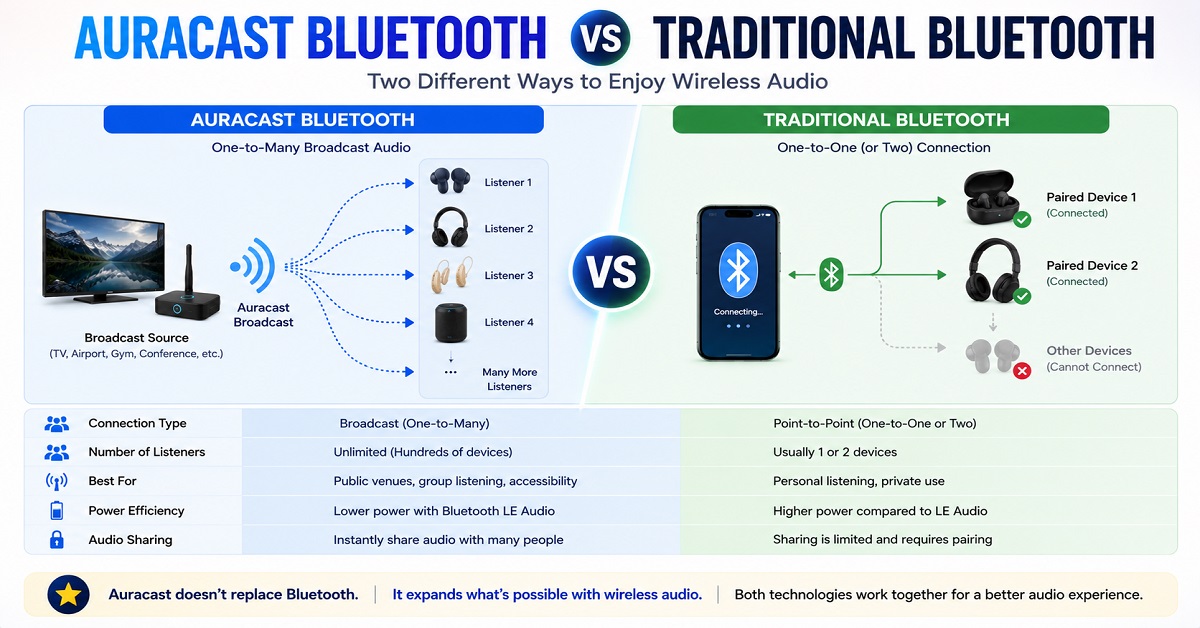
Auracast Bluetooth vs Traditional Bluetooth
Although both technologies are designed for wireless audio, they work in very different ways.
| Feature | Auracast Bluetooth | Traditional Bluetooth |
|---|---|---|
| Connection Type | Broadcast audio | One-to-one pairing |
| Multiple Listeners | ✅ Yes | ❌ Limited |
| Public Audio Sharing | ✅ Yes | ❌ No |
| Built on LE Audio | ✅ Yes | ❌ No |
| Better Accessibility | ✅ Yes | Limited |
| Audio Sharing | Simple | Limited |
| Typical Use | Public venues, TV, group listening | Personal listening |
Which Is Better?
Traditional Bluetooth is still the best choice for private listening between your phone and earbuds.
Auracast doesn’t replace traditional Bluetooth—it adds a completely new way to share audio with multiple listeners.
The two technologies are designed to complement each other rather than compete.
Auracast Bluetooth vs Bluetooth Multipoint
Auracast and Bluetooth Multipoint are often confused, but they solve completely different problems.
| Feature | Auracast | Bluetooth Multipoint |
|---|---|---|
| Purpose | Broadcast audio | Connect one headset to multiple devices |
| Main Benefit | One source to many listeners | Easy switching between devices |
| Typical Example | Airport announcements | Laptop and smartphone connected simultaneously |
| Best For | Public audio sharing | Productivity and multitasking |
For example:
If your earbuds are connected to both your laptop and smartphone at the same time, you’re using Bluetooth Multipoint.
If an airport broadcasts announcements that hundreds of compatible earbuds can receive simultaneously, that’s Auracast.
Both technologies are useful, and many future earbuds may support both features.
Related Reading: If you’d like to learn more about Multipoint technology, check out our guide on What Is Bluetooth Multipoint Connectivity?
Our Verdict So Far
Auracast Bluetooth isn’t just a small upgrade—it’s a significant step forward in how wireless audio can be shared and experienced. Features like broadcast audio, support for multiple listeners, improved accessibility, and lower power consumption make it far more versatile than traditional Bluetooth in many situations.
However, it’s important to remember that Auracast is still in its early stages. While the technology is promising, widespread adoption will depend on more smartphones, earbuds, headphones, TVs, and public venues adding support over the coming years.
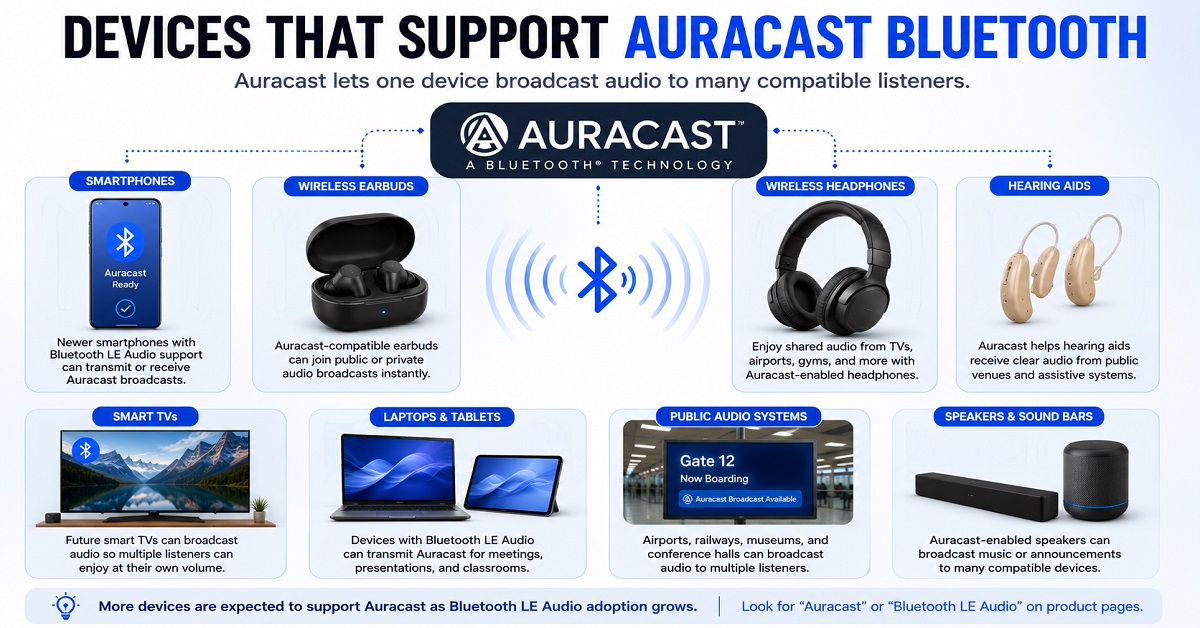
Devices That Support Auracast Bluetooth
Auracast Bluetooth is still a relatively new technology, so not every Bluetooth device supports it yet. However, more manufacturers are adding Auracast compatibility to their latest products each year.
Here are the main types of devices that can support Auracast.
Smartphones
Several newer smartphones include hardware capable of supporting Bluetooth LE Audio and Auracast, although availability depends on the device model and software version.
Support is gradually expanding across flagship Android smartphones, and more models are expected to adopt Auracast over the coming years.
Wireless Earbuds
Many premium wireless earbuds launched in recent years are beginning to support Auracast through hardware compatibility or software updates.
If you’re planning to keep your earbuds for several years, choosing an Auracast-compatible model can be a smart long-term investment.
Wireless Headphones
Premium Bluetooth headphones are also starting to include Auracast support, especially models built around Bluetooth LE Audio.
This allows users to enjoy shared audio broadcasts in public spaces while maintaining the comfort and sound quality of over-ear headphones.
Hearing Aids
One of Auracast’s biggest advantages is improved accessibility.
Compatible hearing aids can receive broadcasts directly from televisions, public venues, lecture halls, and announcement systems without requiring separate assistive listening equipment.
Smart TVs
Future smart TVs are expected to broadcast audio using Auracast.
Instead of increasing the TV volume or disturbing others, multiple family members can listen privately using their own compatible earbuds or headphones.
Public Audio Systems
Auracast is also expected to become increasingly common in public places, including:
- Airports
- Railway stations
- Museums
- Conference centres
- Universities
- Sports stadiums
- Gyms
- Theatres
As adoption grows, users will simply select the available Auracast broadcast and begin listening.
Should You Buy Auracast-Compatible Earbuds?
Whether Auracast is worth paying extra for depends on how you use your earbuds.
Buy Auracast-Compatible Earbuds If:
- You plan to keep your earbuds for several years.
- You want the latest Bluetooth features.
- You frequently travel through airports or railway stations.
- You enjoy future-ready technology.
- You attend conferences, lectures, or public events.
- You use hearing accessibility features.
- You often watch TV with family members.
Choosing Auracast support today can help ensure your earbuds remain useful as more devices and public venues adopt the technology.
You Can Skip Auracast If:
- You only use Bluetooth for music on your phone.
- You’re shopping on a tight budget.
- None of your current devices support Bluetooth LE Audio.
- You rarely visit places where public audio broadcasts are available.
For many users, traditional Bluetooth earbuds will continue to work perfectly well for everyday listening.
Pros and Cons of Auracast Bluetooth
Who Should Avoid Auracast?
Auracast is an exciting technology, but it isn’t essential for everyone.
You may not need to prioritise Auracast if:
- You only use earbuds occasionally for casual music listening.
- You rarely travel or visit public venues.
- You’re looking for the most affordable earbuds possible.
- You don’t plan to upgrade your phone or other devices anytime soon.
In these situations, traditional Bluetooth earbuds can still provide an excellent listening experience.
Is Auracast Bluetooth Worth It?
Yes—but with one important consideration.
Auracast is less about replacing traditional Bluetooth and more about expanding what wireless audio can do.
Today, its biggest limitation is availability. While the technology is ready, widespread support across smartphones, earbuds, TVs, and public venues is still growing.
However, if you’re planning to buy premium wireless earbuds in 2026, choosing a model that supports Bluetooth LE Audio and Auracast could be a smart investment for the future.
As more manufacturers and public venues adopt the technology, you’ll be able to take advantage of features that older Bluetooth devices simply can’t offer.
Final Verdict
Auracast Bluetooth represents one of the most significant advancements in wireless audio since the introduction of true wireless earbuds.
By allowing a single device to broadcast audio to multiple compatible listeners, it opens up new possibilities for entertainment, accessibility, education, travel, and public communication.
Although the technology is still in the early stages of adoption, its future looks promising. As more smartphones, earbuds, headphones, hearing aids, televisions, and public venues embrace Bluetooth LE Audio, Auracast is expected to become a standard feature in many everyday listening experiences.
If you’re shopping for premium earbuds or headphones today, Auracast isn’t a must-have yet—but it is certainly a valuable feature that can help future-proof your purchase.
Recommended Auracast-Compatible Earbuds
If you’re planning to upgrade your audio gear, consider choosing earbuds that support Bluetooth LE Audio and Auracast (where available). While support is still expanding, buying compatible devices today means you’ll be ready to take advantage of this technology as it becomes more widely adopted.
Sennheiser Momentum True Wireless 4 Earbuds is a Auracast-Compatible Earbuds. You can check on Amazon once.
Why You Can Trust Audiopick
At Audiopick, we publish in-depth headphone and earbud reviews, comparisons, and educational guides designed to help readers make informed buying decisions.
Our articles are based on official specifications, trusted industry information, manufacturer documentation, and practical real-world use cases. We explain audio technologies in simple language so that both beginners and experienced users can understand how they work and whether they’re worth considering.
Our goal is to help you choose the right audio products with confidence.
Frequently Asked Questions (FAQs)
Is Auracast Bluetooth the same as Bluetooth?
No. Auracast is a feature built on Bluetooth LE Audio that allows one device to broadcast audio to multiple compatible listeners simultaneously.
Does Auracast require an internet connection?
No. Auracast works over Bluetooth and does not require Wi-Fi or an internet connection to broadcast audio.
Do all Bluetooth earbuds support Auracast?
No. Only earbuds that support Bluetooth LE Audio and Auracast compatibility can receive Auracast broadcasts.
Can multiple people listen to the same Auracast broadcast?
Yes. That’s one of Auracast’s biggest advantages. Many compatible devices can listen to the same audio broadcast at the same time.
Is Auracast better than traditional Bluetooth?
Auracast isn’t a replacement for traditional Bluetooth. Instead, it adds new capabilities like broadcast audio and shared listening while traditional Bluetooth remains ideal for private device-to-device connections.
Does Auracast improve sound quality?
Auracast itself doesn’t directly improve sound quality, but because it’s built on Bluetooth LE Audio and the LC3 codec, compatible devices can deliver more efficient and potentially better-quality audio than older Bluetooth audio technologies.
Can I use Auracast with my TV?
Yes, provided both your TV and your earbuds or headphones support Auracast. Support is gradually becoming available on newer devices.
Is Auracast available on Android phones?
Some newer Android smartphones support Bluetooth LE Audio and Auracast, while others may gain support through software updates. Availability depends on the manufacturer and device model.
Related Articles
If you’re interested in learning more about wireless audio technologies, you may also enjoy these guides:
- What Is Bluetooth Multipoint Connectivity?
- What Is ANC in Headphones and How Does It Work?
- What Are Headphone Drivers? Types, Sizes, and Do They Matter?
- Open-Ear Earbuds vs Bone Conduction Headphones

About the Author
Hari Prasad is the editor of AudioPick.in and a lifelong audio enthusiast. He writes detailed, honest reviews and guides to help everyday users pick the right gear without tech jargon. His personal interest in Bluetooth audio, neckbands, and codecs comes from testing dozens of devices over the past few years.